> ## Documentation Index
> Fetch the complete documentation index at: https://getlago.com/docs/llms.txt
> Use this file to discover all available pages before exploring further.
# Retrieve usage
> Monitor ingested events, debug warnings, and retrieve current, projected, or past usage data for your customers.
## Events list
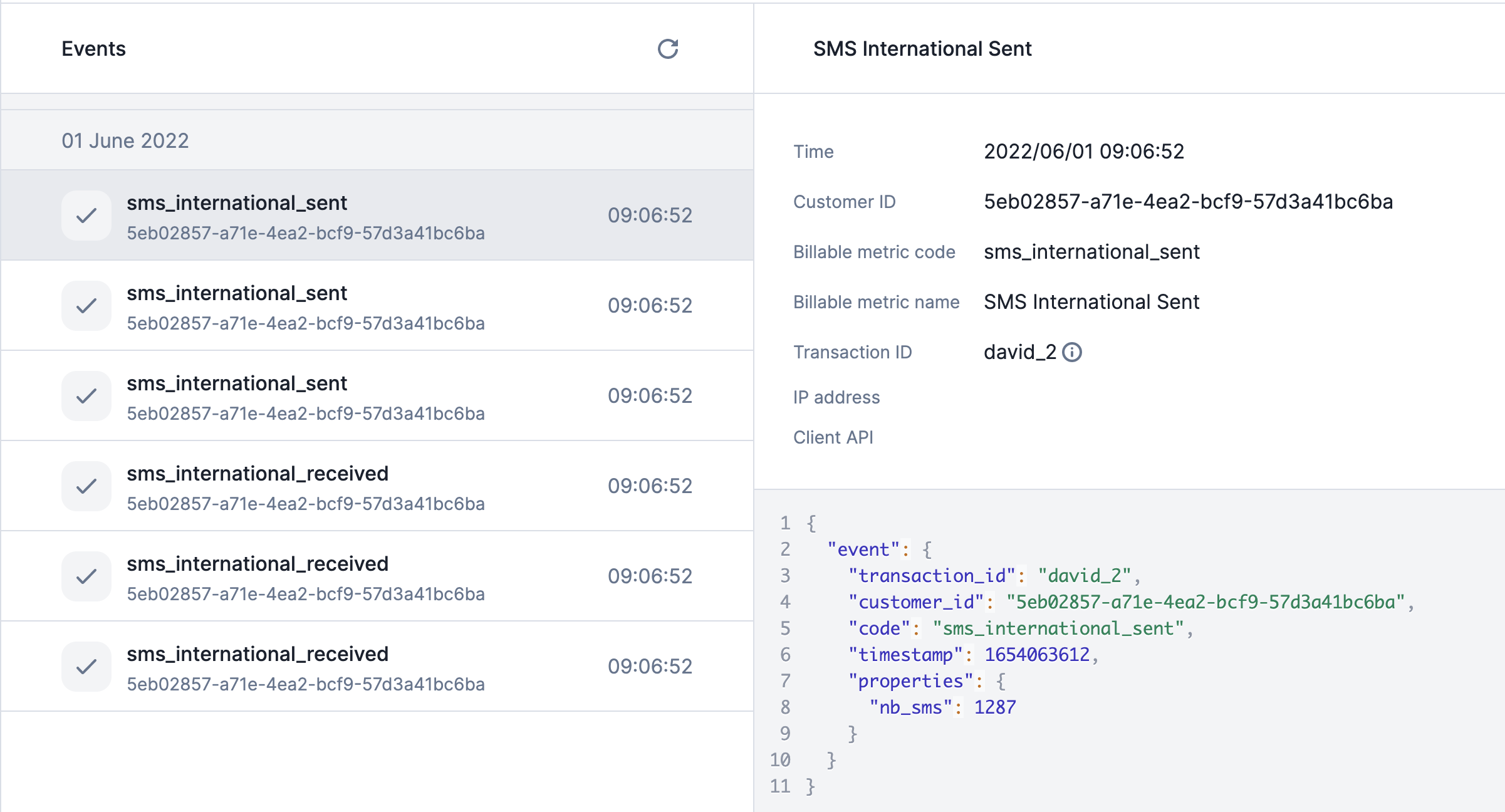
You can monitor every event flowing into Lago from the UI. This is your primary tool for verifying that your integration is working and debugging any issues.
Go to the **Developers** section in the sidebar, then click the **Events** tab.
The UI shows the latest 20 events by default. Scroll down to load more.
Click any event to see its details:
* **Time:** timestamp of the received event
* **Customer ID:** the ID of your customer
* **Billable metric code:** code of the billable metric linked to the event
* **Billable metric name:** name of the billable metric linked to the event
* **Transaction ID:** unique `transaction_id` used as the idempotency key
* **IP Address:** IP address of the event sender
* **Client API:** Lago Client API used to send the event
* **Event payload:** the full JSON arguments sent in the request
If an event is not shown in the UI, it has **not** been ingested.
 ### Possible warnings
Some events can be ingested but trigger unexpected behavior. Lago displays two possible warnings in the UI:
1. The event `code` is **not related to an existing billable metric**
2. The billable metric's **property used for the aggregation is not sent** through this event
***
## Retrieve current usage
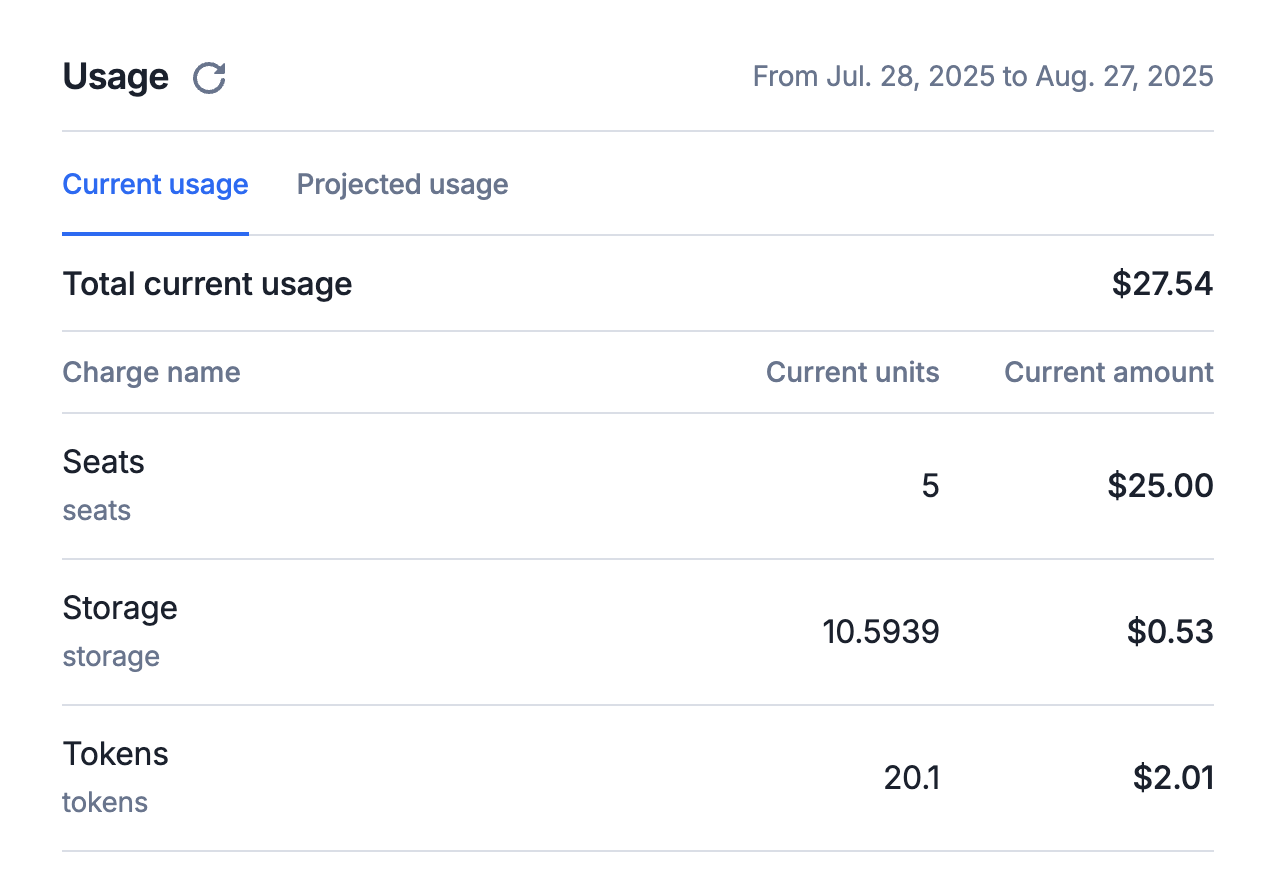
The [current usage endpoint](../../api-reference/customer-usage/get-current) retrieves real-time usage data for the current open billing period.
Because this billing period is still ongoing, invoice details are subject to change as new usage continues to accrue.
Whether it's fetched from the UI or the API, the response includes:
1. Aggregated usage data for the current period: Total units consumed and total customers' cost (so far)
2. Detailed breakdowns per metric: Units and amounts by metric and optional sub-breakdowns by filters or groupings (e.g., per project, environment, or AI models)
Note: Since the billing period is not yet finalized, the retrieved data should be treated as provisional. Final invoice values may differ.
Notice that if the events were sent with a timestamp in the future, they are taken into account in current usage. Yet, if you terminate the
subscription before the timestamp of this event, it will be ignored in the termination invoice.
### Possible warnings
Some events can be ingested but trigger unexpected behavior. Lago displays two possible warnings in the UI:
1. The event `code` is **not related to an existing billable metric**
2. The billable metric's **property used for the aggregation is not sent** through this event
***
## Retrieve current usage
The [current usage endpoint](../../api-reference/customer-usage/get-current) retrieves real-time usage data for the current open billing period.
Because this billing period is still ongoing, invoice details are subject to change as new usage continues to accrue.
Whether it's fetched from the UI or the API, the response includes:
1. Aggregated usage data for the current period: Total units consumed and total customers' cost (so far)
2. Detailed breakdowns per metric: Units and amounts by metric and optional sub-breakdowns by filters or groupings (e.g., per project, environment, or AI models)
Note: Since the billing period is not yet finalized, the retrieved data should be treated as provisional. Final invoice values may differ.
Notice that if the events were sent with a timestamp in the future, they are taken into account in current usage. Yet, if you terminate the
subscription before the timestamp of this event, it will be ignored in the termination invoice.
 ```bash Retrieve current usage theme={"dark"}
LAGO_URL="https://api.getlago.com"
API_KEY="__YOUR_API_KEY__"
EXTERNAL_CUSTOMER_ID="__EXTERNAL_CUSTOMER_ID__"
EXTERNAL_SUBSCRIPTION_ID="__EXTERNAL_SUBSCRIPTION_ID__"
curl --location --request GET "$LAGO_URL/api/v1/customers/$EXTERNAL_CUSTOMER_ID/current_usage?external_subscription_id=$EXTERNAL_SUBSCRIPTION_ID" \
--header "Authorization: Bearer $API_KEY" \
--header 'Content-Type: application/json'
```
## Retrieve projected usage
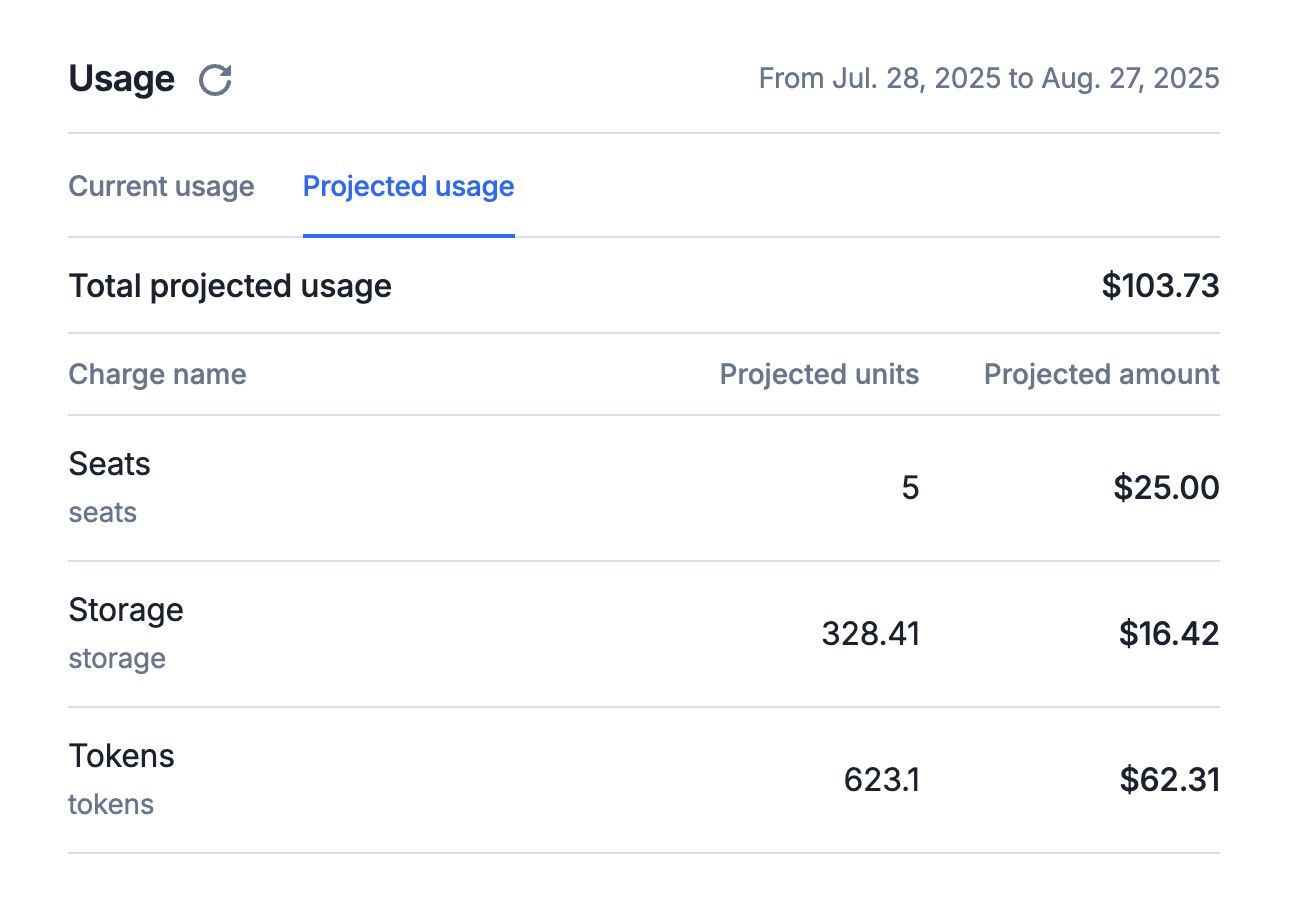
Another endpoint provides an estimate of usage and billing amounts projected through the end of the current billing period.
It uses current consumption trends and billing configuration to forecast the likely totals at period close. Projected usage is listed under the [projected usage endpoint](../../api-reference/customer-usage/get-projected).
Whether it's fetched from the UI or the API, the response includes:
1. Projected total usage units and estimated billing amount for the full billing period
2. Per-metric projections, including: Forecasted units and amounts for each billable metric and projections broken down by optional sub-filters or groups (e.g., per project, environment, or AI models)
Note: Recurring metrics, such as Seats, typically remain stable over time, unlike metered metrics which fluctuate. Therefore, the projected usage for a recurring metric is assumed to be equal to its current usage.
```bash Retrieve current usage theme={"dark"}
LAGO_URL="https://api.getlago.com"
API_KEY="__YOUR_API_KEY__"
EXTERNAL_CUSTOMER_ID="__EXTERNAL_CUSTOMER_ID__"
EXTERNAL_SUBSCRIPTION_ID="__EXTERNAL_SUBSCRIPTION_ID__"
curl --location --request GET "$LAGO_URL/api/v1/customers/$EXTERNAL_CUSTOMER_ID/current_usage?external_subscription_id=$EXTERNAL_SUBSCRIPTION_ID" \
--header "Authorization: Bearer $API_KEY" \
--header 'Content-Type: application/json'
```
## Retrieve projected usage
Another endpoint provides an estimate of usage and billing amounts projected through the end of the current billing period.
It uses current consumption trends and billing configuration to forecast the likely totals at period close. Projected usage is listed under the [projected usage endpoint](../../api-reference/customer-usage/get-projected).
Whether it's fetched from the UI or the API, the response includes:
1. Projected total usage units and estimated billing amount for the full billing period
2. Per-metric projections, including: Forecasted units and amounts for each billable metric and projections broken down by optional sub-filters or groups (e.g., per project, environment, or AI models)
Note: Recurring metrics, such as Seats, typically remain stable over time, unlike metered metrics which fluctuate. Therefore, the projected usage for a recurring metric is assumed to be equal to its current usage.
 ```bash Retrieve projected usage theme={"dark"}
LAGO_URL="https://api.getlago.com"
API_KEY="__YOUR_API_KEY__"
EXTERNAL_CUSTOMER_ID="__EXTERNAL_CUSTOMER_ID__"
EXTERNAL_SUBSCRIPTION_ID="__EXTERNAL_SUBSCRIPTION_ID__"
curl --location --request GET "$LAGO_URL/api/v1/customers/$EXTERNAL_CUSTOMER_ID/projected_usage?external_subscription_id=$EXTERNAL_SUBSCRIPTION_ID" \
--header "Authorization: Bearer $API_KEY" \
--header 'Content-Type: application/json'
```
## Retrieve past usage
The [past usage endpoint](../../api-reference/customer-usage/get-past) allows you to retrieve customer usage data for closed billing periods.
Once a billing period has ended and is marked as closed, the associated usage data becomes final and immutable, ensuring consistency in billing and reporting.
Modifying the price of a metric, or even deleting a metric, has no effect on past usage or previously issued invoices.
Once a billing period is closed and its associated invoice is finalized, the past usage quantities, pricing, and resulting fees are locked.
```bash Retrieve past usage theme={"dark"}
LAGO_URL="https://api.getlago.com"
API_KEY="__YOUR_API_KEY__"
EXTERNAL_CUSTOMER_ID="__EXTERNAL_CUSTOMER_ID__"
EXTERNAL_SUBSCRIPTION_ID="__EXTERNAL_SUBSCRIPTION_ID__"
curl --location --request GET "$LAGO_URL/api/v1/customers/$EXTERNAL_CUSTOMER_ID/past_usage?external_subscription_id=$EXTERNAL_SUBSCRIPTION_ID" \
--header "Authorization: Bearer $API_KEY" \
--header 'Content-Type: application/json'
```
## Usage breakdown with presentation group keys
When a charge defines [presentation group keys](/guide/plans/charges/grouping#presentation-group-keys), the **current, projected, and past** usage responses include a units-only breakdown of each charge's usage across those keys. This is purely for visibility; it never affects the amounts.
Where the breakdown appears depends on whether the charge also has pricing group keys:
* **No pricing group keys**: the breakdown sits at the charge level, in a `presentation_breakdowns` array:
```json theme={"dark"}
{
"charges_usage": [
{
"units": "100.0",
"amount_cents": 7000,
"presentation_breakdowns": [
{ "presentation_by": { "department": "eng" }, "units": "60.0" },
{ "presentation_by": { "department": "sales" }, "units": "40.0" }
]
}
]
}
```
* **With pricing group keys**: the breakdown is nested inside each `grouped_usage` entry, as `presentation_breakdowns`:
```json theme={"dark"}
{
"charges_usage": [
{
"units": "100.0",
"amount_cents": 7000,
"grouped_usage": [
{
"grouped_by": { "region": "eu" },
"units": "100.0",
"amount_cents": 7000,
"presentation_breakdowns": [
{ "presentation_by": { "department": "eng" }, "units": "60.0" },
{ "presentation_by": { "department": "sales" }, "units": "40.0" }
]
}
]
}
]
}
```
Pass the optional `filter_by_presentation` query parameter to limit the response to a subset of the configured presentation keys. For example, `filter_by_presentation=["region"]` collapses a `region · city` breakdown down to region only. The parameter name follows the same `filter_by` convention as the current usage endpoint.
***
## Retrieve usage analytics
The current, projected, and past usage endpoints above are scoped to a **single subscription**. When you need to look at usage **across customers, plans, or metrics**, or to break consumption down over a **time window**, use the [usage analytics endpoint](../../api-reference/customer-usage/usages) (`GET /analytics/usage`).
This endpoint aggregates the units consumed and the amounts billed, and lets you slice that data with a set of filters. It is the right tool when you want to answer questions like *"how many units did this metric generate per day last month?"* or *"why was this invoice billed the way it was?"*.
Usage analytics is part of Lago's [analytics layer](../../guide/analytics/reports) and is a premium feature. The same data also powers the analytics dashboards in the UI.
### Filters
All filters are optional and can be combined. When several filters are set, they are applied together (logical `AND`), progressively narrowing the result set.
| Filter | Type | Description |
| ------------------------------ | -------------------------------- | ---------------------------------------------------------------------------------------------------------------------- |
| `time_granularity` | `daily` \| `weekly` \| `monthly` | Splits the result into time buckets at the chosen resolution. See [The date window](#the-date-window) below. |
| `from_date` | date (`YYYY-MM-DD`) | Start of the period the analytics are computed for. |
| `to_date` | date (`YYYY-MM-DD`) | End of the period the analytics are computed for. |
| `currency` | ISO 4217 (e.g. `USD`) | Returns amounts converted to this currency, so usage billed in different currencies can be compared on a single scale. |
| `external_customer_id` | string | Restricts the analytics to a single customer. |
| `external_subscription_id` | string | Restricts the analytics to a single subscription. |
| `plan_code` | string | Restricts the analytics to subscriptions on a given plan. |
| `billable_metric_code` | string | Restricts the analytics to a single usage-based billable metric. |
| `is_billable_metric_recurring` | boolean | Keeps only recurring (`true`) or non-recurring (`false`) metrics. |
| `customer_type` | `individual` \| `company` | Filters by the type of customer. |
| `customer_country` | ISO 3166-1 alpha-2 (e.g. `US`) | Filters by the customer's billing country. |
Each row of the response carries the period boundaries (`start_of_period_dt`, `end_of_period_dt`), the `billable_metric_code`, the `units` consumed, and the billed `amount_cents` in `amount_currency`.
### The date window
The combination of `from_date`, `to_date`, and `time_granularity` is what makes this endpoint useful for **reconciliation**.
* **`from_date` / `to_date`** define the window the analytics cover. Set them to the start and end of a billing period to look at exactly what a given invoice was computed from.
* **`time_granularity`** controls how that window is sliced. With `daily`, you get **one row per day per metric**, so you can see the units that accrued each day and the corresponding amount, rather than a single aggregated total.
This daily breakdown is the key to **finding back why a customer was invoiced a given number of units and a given amount**. When an invoice total looks unexpected, query `/analytics/usage` over that invoice's billing period with `time_granularity=daily`, filtered on the relevant `external_subscription_id` and `billable_metric_code`. The day-by-day series shows exactly when consumption spiked, lets you tie each day's units to the amount they generated, and makes it possible to trace the invoiced total back to the underlying daily usage.
For an invoice you want to explain, set `from_date` and `to_date` to that invoice's billing period boundaries and use `time_granularity=daily`. Summing the daily `units` and `amount_cents` returned reconciles back to the invoiced totals.
```bash Retrieve daily usage for reconciliation theme={"dark"}
LAGO_URL="https://api.getlago.com"
API_KEY="__YOUR_API_KEY__"
EXTERNAL_SUBSCRIPTION_ID="__EXTERNAL_SUBSCRIPTION_ID__"
BILLABLE_METRIC_CODE="__BILLABLE_METRIC_CODE__"
curl --location --request GET "$LAGO_URL/api/v1/analytics/usage?\
external_subscription_id=$EXTERNAL_SUBSCRIPTION_ID&\
billable_metric_code=$BILLABLE_METRIC_CODE&\
time_granularity=daily&\
from_date=2023-11-01&\
to_date=2023-11-30" \
--header "Authorization: Bearer $API_KEY" \
--header 'Content-Type: application/json'
```
```bash Retrieve projected usage theme={"dark"}
LAGO_URL="https://api.getlago.com"
API_KEY="__YOUR_API_KEY__"
EXTERNAL_CUSTOMER_ID="__EXTERNAL_CUSTOMER_ID__"
EXTERNAL_SUBSCRIPTION_ID="__EXTERNAL_SUBSCRIPTION_ID__"
curl --location --request GET "$LAGO_URL/api/v1/customers/$EXTERNAL_CUSTOMER_ID/projected_usage?external_subscription_id=$EXTERNAL_SUBSCRIPTION_ID" \
--header "Authorization: Bearer $API_KEY" \
--header 'Content-Type: application/json'
```
## Retrieve past usage
The [past usage endpoint](../../api-reference/customer-usage/get-past) allows you to retrieve customer usage data for closed billing periods.
Once a billing period has ended and is marked as closed, the associated usage data becomes final and immutable, ensuring consistency in billing and reporting.
Modifying the price of a metric, or even deleting a metric, has no effect on past usage or previously issued invoices.
Once a billing period is closed and its associated invoice is finalized, the past usage quantities, pricing, and resulting fees are locked.
```bash Retrieve past usage theme={"dark"}
LAGO_URL="https://api.getlago.com"
API_KEY="__YOUR_API_KEY__"
EXTERNAL_CUSTOMER_ID="__EXTERNAL_CUSTOMER_ID__"
EXTERNAL_SUBSCRIPTION_ID="__EXTERNAL_SUBSCRIPTION_ID__"
curl --location --request GET "$LAGO_URL/api/v1/customers/$EXTERNAL_CUSTOMER_ID/past_usage?external_subscription_id=$EXTERNAL_SUBSCRIPTION_ID" \
--header "Authorization: Bearer $API_KEY" \
--header 'Content-Type: application/json'
```
## Usage breakdown with presentation group keys
When a charge defines [presentation group keys](/guide/plans/charges/grouping#presentation-group-keys), the **current, projected, and past** usage responses include a units-only breakdown of each charge's usage across those keys. This is purely for visibility; it never affects the amounts.
Where the breakdown appears depends on whether the charge also has pricing group keys:
* **No pricing group keys**: the breakdown sits at the charge level, in a `presentation_breakdowns` array:
```json theme={"dark"}
{
"charges_usage": [
{
"units": "100.0",
"amount_cents": 7000,
"presentation_breakdowns": [
{ "presentation_by": { "department": "eng" }, "units": "60.0" },
{ "presentation_by": { "department": "sales" }, "units": "40.0" }
]
}
]
}
```
* **With pricing group keys**: the breakdown is nested inside each `grouped_usage` entry, as `presentation_breakdowns`:
```json theme={"dark"}
{
"charges_usage": [
{
"units": "100.0",
"amount_cents": 7000,
"grouped_usage": [
{
"grouped_by": { "region": "eu" },
"units": "100.0",
"amount_cents": 7000,
"presentation_breakdowns": [
{ "presentation_by": { "department": "eng" }, "units": "60.0" },
{ "presentation_by": { "department": "sales" }, "units": "40.0" }
]
}
]
}
]
}
```
Pass the optional `filter_by_presentation` query parameter to limit the response to a subset of the configured presentation keys. For example, `filter_by_presentation=["region"]` collapses a `region · city` breakdown down to region only. The parameter name follows the same `filter_by` convention as the current usage endpoint.
***
## Retrieve usage analytics
The current, projected, and past usage endpoints above are scoped to a **single subscription**. When you need to look at usage **across customers, plans, or metrics**, or to break consumption down over a **time window**, use the [usage analytics endpoint](../../api-reference/customer-usage/usages) (`GET /analytics/usage`).
This endpoint aggregates the units consumed and the amounts billed, and lets you slice that data with a set of filters. It is the right tool when you want to answer questions like *"how many units did this metric generate per day last month?"* or *"why was this invoice billed the way it was?"*.
Usage analytics is part of Lago's [analytics layer](../../guide/analytics/reports) and is a premium feature. The same data also powers the analytics dashboards in the UI.
### Filters
All filters are optional and can be combined. When several filters are set, they are applied together (logical `AND`), progressively narrowing the result set.
| Filter | Type | Description |
| ------------------------------ | -------------------------------- | ---------------------------------------------------------------------------------------------------------------------- |
| `time_granularity` | `daily` \| `weekly` \| `monthly` | Splits the result into time buckets at the chosen resolution. See [The date window](#the-date-window) below. |
| `from_date` | date (`YYYY-MM-DD`) | Start of the period the analytics are computed for. |
| `to_date` | date (`YYYY-MM-DD`) | End of the period the analytics are computed for. |
| `currency` | ISO 4217 (e.g. `USD`) | Returns amounts converted to this currency, so usage billed in different currencies can be compared on a single scale. |
| `external_customer_id` | string | Restricts the analytics to a single customer. |
| `external_subscription_id` | string | Restricts the analytics to a single subscription. |
| `plan_code` | string | Restricts the analytics to subscriptions on a given plan. |
| `billable_metric_code` | string | Restricts the analytics to a single usage-based billable metric. |
| `is_billable_metric_recurring` | boolean | Keeps only recurring (`true`) or non-recurring (`false`) metrics. |
| `customer_type` | `individual` \| `company` | Filters by the type of customer. |
| `customer_country` | ISO 3166-1 alpha-2 (e.g. `US`) | Filters by the customer's billing country. |
Each row of the response carries the period boundaries (`start_of_period_dt`, `end_of_period_dt`), the `billable_metric_code`, the `units` consumed, and the billed `amount_cents` in `amount_currency`.
### The date window
The combination of `from_date`, `to_date`, and `time_granularity` is what makes this endpoint useful for **reconciliation**.
* **`from_date` / `to_date`** define the window the analytics cover. Set them to the start and end of a billing period to look at exactly what a given invoice was computed from.
* **`time_granularity`** controls how that window is sliced. With `daily`, you get **one row per day per metric**, so you can see the units that accrued each day and the corresponding amount, rather than a single aggregated total.
This daily breakdown is the key to **finding back why a customer was invoiced a given number of units and a given amount**. When an invoice total looks unexpected, query `/analytics/usage` over that invoice's billing period with `time_granularity=daily`, filtered on the relevant `external_subscription_id` and `billable_metric_code`. The day-by-day series shows exactly when consumption spiked, lets you tie each day's units to the amount they generated, and makes it possible to trace the invoiced total back to the underlying daily usage.
For an invoice you want to explain, set `from_date` and `to_date` to that invoice's billing period boundaries and use `time_granularity=daily`. Summing the daily `units` and `amount_cents` returned reconciles back to the invoiced totals.
```bash Retrieve daily usage for reconciliation theme={"dark"}
LAGO_URL="https://api.getlago.com"
API_KEY="__YOUR_API_KEY__"
EXTERNAL_SUBSCRIPTION_ID="__EXTERNAL_SUBSCRIPTION_ID__"
BILLABLE_METRIC_CODE="__BILLABLE_METRIC_CODE__"
curl --location --request GET "$LAGO_URL/api/v1/analytics/usage?\
external_subscription_id=$EXTERNAL_SUBSCRIPTION_ID&\
billable_metric_code=$BILLABLE_METRIC_CODE&\
time_granularity=daily&\
from_date=2023-11-01&\
to_date=2023-11-30" \
--header "Authorization: Bearer $API_KEY" \
--header 'Content-Type: application/json'
```