Define what a customer can access and how much they can use, based on their plan.
Entitlements define what a customer can access and how much they can use, based
on their subscription or contract. They cover four things:
Feature gates control whether a feature is enabled for a customer.
Feature privileges determine the level of access within a feature, such
as basic or advanced functionality.
Allowances represent the usage included in a plan, like 100 API calls per
month.
Quotas are the maximum usage limits, which may trigger overage charges or
access restrictions.
Together, these enforce product limits, manage access, and support usage-based
billing. Lago handles allowances and quotas through its usage-based engine, and
feature gates and privileges through Features and Entitlements.
You can create any type of feature to tailor your billing logic. To create a feature:
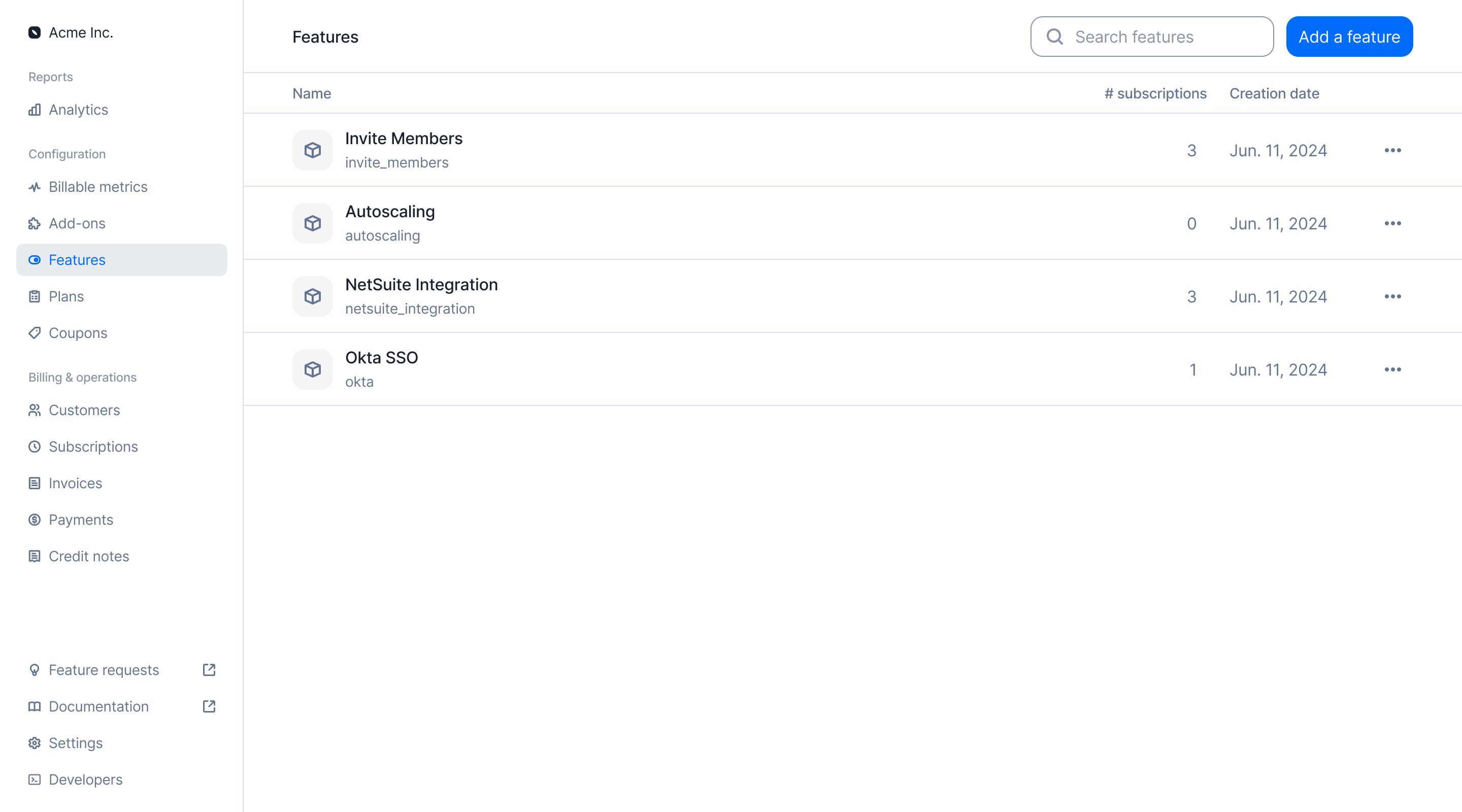
Navigate to the Features section in the sidebar;
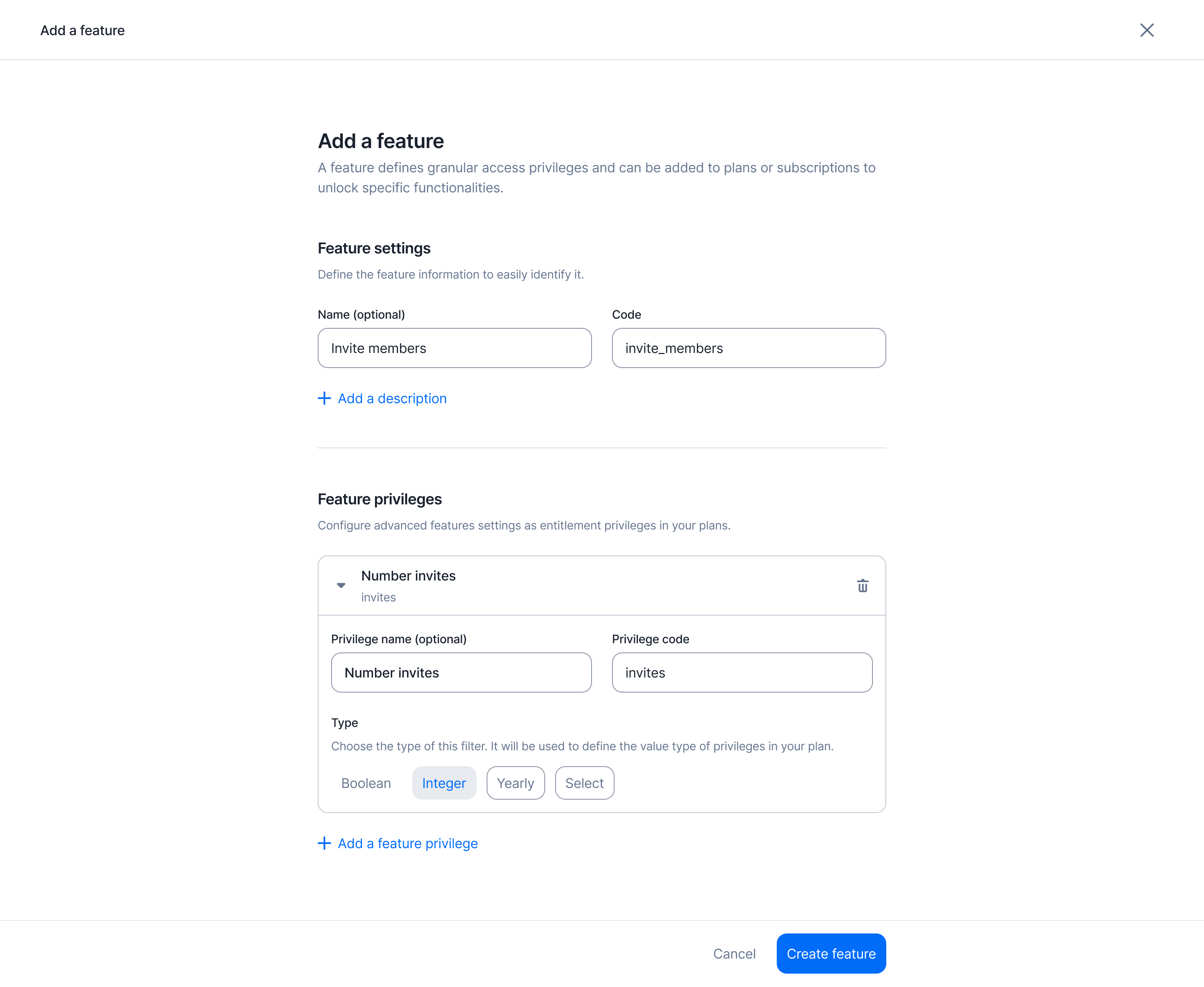
Click on Add a feature to start a new entry;
Give it a unique code (used for programmatic actions) and a name;
Assign one or more privileges to the feature (optional); and
Click Create feature to finalize and save the feature to your instance.
A feature in Lago represents a capability that can be gated behind a plan. It’s not necessarily something you bill for directly, but rather something a customer gains access to based on their subscription.
Features section with the list of features
curl --request POST \
  --url https://api.getlago.com/api/v1/features \
  --header 'Authorization: Bearer __YOUR_API_KEY__' \
  --header 'Content-Type: application/json' \
  --data '{
    "feature": {
      "code": "seats",
      "name": "Number of seats",
      "description": "Number of users that can be added to the account"
    }
  }'
You can also define privileges for a specific feature. Privileges give you more granular access controls across plans. For example, the invite_member feature can allow 1 member on the Free plan and unlimited invites on the Pro plan.Feature privileges can be associated with the following types:
boolean – The privilege value is either true or false.
integer – The privilege value is a numeric limit (e.g., 10 GPUs).
string – The privilege value is freeform text.
select – The privilege value is chosen from a predefined list of options, which you list in config.select_options.
value_type defaults to string and cannot be changed once the privilege exists.At this stage, you only define the type of each privilege. You set the values later, when you entitle the feature to a plan or a subscription.
You can add an unlimited number of privileges to a feature.
Once your features exist, you add them to your plans through Entitlements.
An entitlement defines which features a plan unlocks, and the limits, values or privileges of each feature.
By assigning features to plans, you control access to functionality across your pricing tiers.
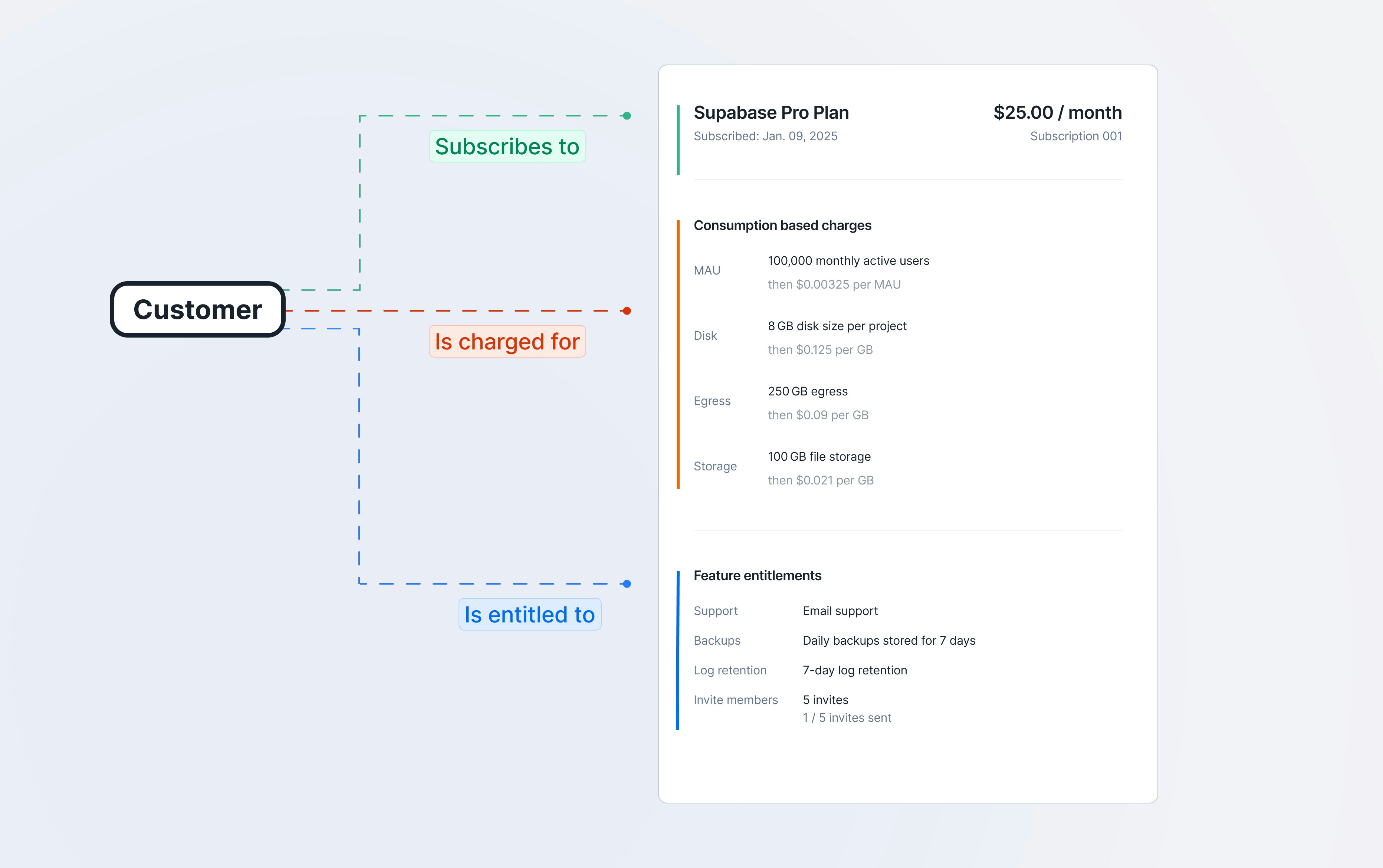
Subscription and entitlement workflow
To assign features to a plan:
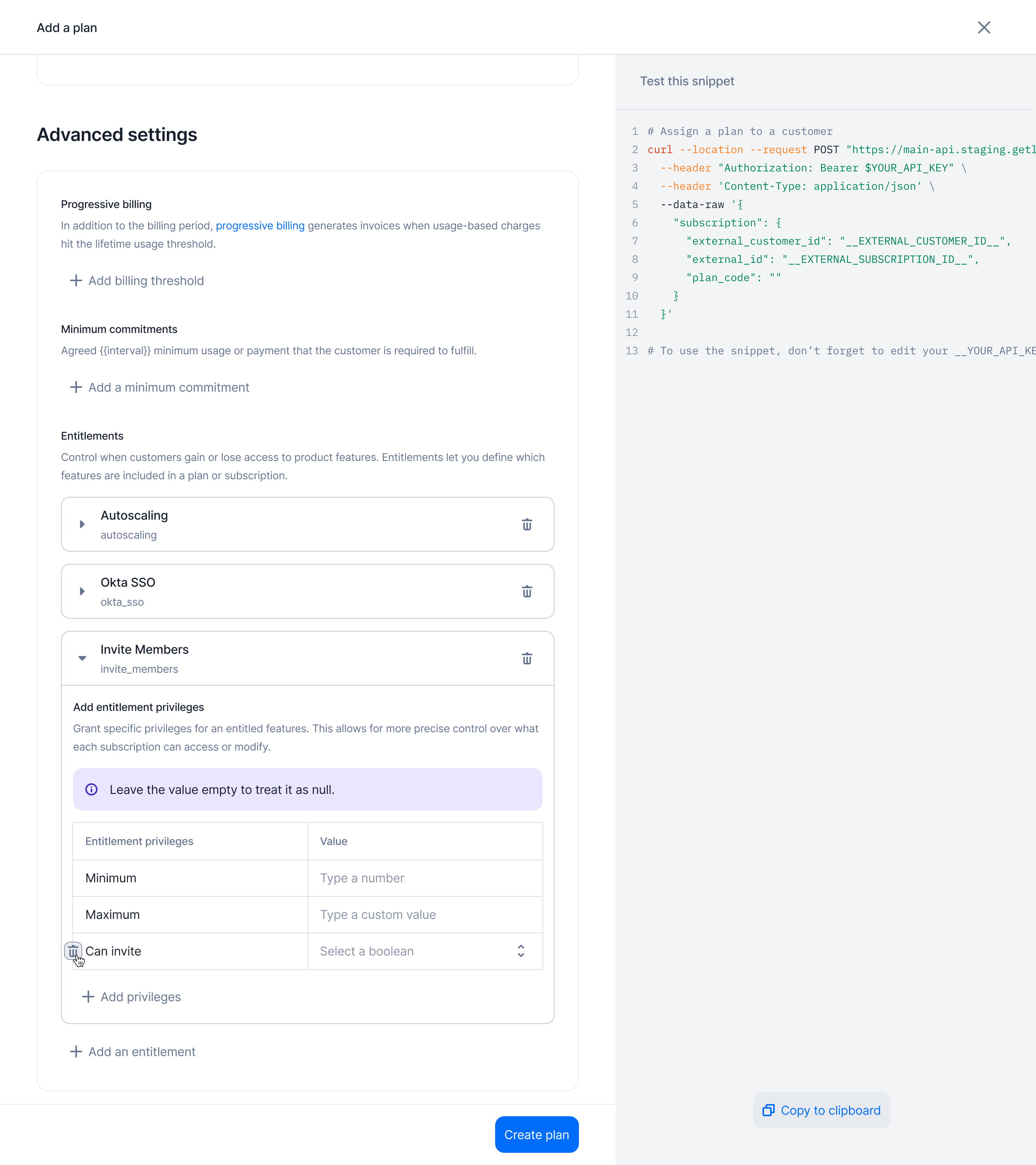
Create a new plan or edit an existing one;
Navigate to the Advanced settings section;
Select the features you want to entitle for that plan; and
Configure the values for each feature’s privileges according to the plan’s rules.
Some customers subscribe to a standard plan but negotiate custom entitlements as part of their contract.You can override any entitlement value for a specific subscription, in the same way you override charges.
Lago stores the override on the subscription itself, so it applies only to that subscription. The base plan and the other subscriptions keep their values.To override the entitlements of a subscription:
Open the subscription and select the Entitlements tab;
Click Add an entitlement to entitle a feature the plan does not include, or open the actions menu of an entitled feature and click Edit entitlement; and
Set the privilege values for this subscription and save.
To take a feature away from this subscription, click Delete entitlement in the same actions menu.
{"docsConfig":{"theme":"mint","$schema":"https://mintlify.com/docs.json","name":"Lago","description":"Developer documentation for Lago, the open-source billing platform for usage metering, subscriptions, invoicing, payments, and revenue operations.","colors":{"primary":"#006CFA","light":"#006CFA","dark":"#006CFA"},"logo":{"light":"https://mintcdn.com/lago-docs/zZSJbpe68PHhSs3x/logo/light.svg?fit=max\u0026auto=format\u0026n=zZSJbpe68PHhSs3x\u0026q=85\u0026s=b4af3001527c985b81858b9a0928534c","dark":"https://mintcdn.com/lago-docs/zZSJbpe68PHhSs3x/logo/dark.svg?fit=max\u0026auto=format\u0026n=zZSJbpe68PHhSs3x\u0026q=85\u0026s=1eb7aacac796b0cc6bf05be790a792b1"},"favicon":"https://mintcdn.com/lago-docs/8N-yOElNGe9jRGG5/favicon.svg?fit=max\u0026auto=format\u0026n=8N-yOElNGe9jRGG5\u0026q=85\u0026s=5c319e58dd9b5c5b8a31cf2ad8009a1c","api":{"openapi":"https://swagger.getlago.com/openapi.yaml","mdx":{"server":"https://api.getlago.com/api/v1"}},"background":{"color":{"light":"#F5F5EF","dark":"#131923"}},"navbar":{"links":[{"href":"https://getlago.com/book-a-demo","label":"Book a Demo"}],"primary":{"type":"button","label":"Get Started","href":"https://getlago.com/book-a-demo"}},"footer":{"socials":{"github":"https://github.com/getlago/lago","slack":"https://getlago.com/slack","x":"https://x.com/getlago","linkedin":"https://www.linkedin.com/company/getlago","youtube":"https://www.youtube.com/channel/UCp6ltp7n3SgDVsmerJ7O7ZA"},"links":[{"header":"Documentation","items":[{"label":"Get started","href":"https://getlago.com/docs/guide/introduction/welcome-to-lago"},{"label":"API reference","href":"https://getlago.com/docs/api-reference/intro"},{"label":"Integrations","href":"https://getlago.com/docs/integrations/introduction"},{"label":"Templates","href":"https://getlago.com/docs/templates/introduction"},{"label":"Changelog","href":"https://getlago.com/docs/changelog/product"},{"label":"FAQ","href":"https://getlago.com/docs/faq/about-lago"}]},{"header":"Developers","items":[{"label":"Developer hub","href":"https://getlago.com/docs/developers"},{"label":"Authentication","href":"https://getlago.com/docs/auth"},{"label":"Webhooks","href":"https://getlago.com/docs/guide/webhooks"},{"label":"SDKs","href":"https://getlago.com/docs/developers"},{"label":"OpenAPI spec","href":"https://swagger.getlago.com/"},{"label":"MCP server","href":"https://getlago.com/docs/guide/ai-agents/mcp-server"},{"label":"Self-hosted","href":"https://getlago.com/docs/guide/lago-self-hosted/overview"},{"label":"llms.txt","href":"https://getlago.com/docs/llms.txt"}]},{"header":"Platform","items":[{"label":"Usage metering","href":"https://getlago.com/platform/usage-metering"},{"label":"Billing \u0026 invoicing","href":"https://getlago.com/platform/billing-invoicing"},{"label":"Cash collection","href":"https://getlago.com/platform/cash-collection"},{"label":"Revenue analytics","href":"https://getlago.com/platform/revenue-analytics"},{"label":"Entitlements","href":"https://getlago.com/platform/entitlements"},{"label":"Lago AI","href":"https://getlago.com/platform/ai"},{"label":"Pricing","href":"https://getlago.com/pricing"}]},{"header":"Company","items":[{"label":"About Lago","href":"https://getlago.com/docs/about"},{"label":"Customers","href":"https://getlago.com/customers"},{"label":"Blog","href":"https://getlago.com/blog"},{"label":"Contact","href":"https://getlago.com/docs/contact"},{"label":"Trust center","href":"https://security.getlago.com"},{"label":"Status","href":"https://status.getlago.com"}]}]},"seo":{"metatags":{"canonical":"https://getlago.com/docs","description":"Developer documentation for Lago's API-first billing platform, including OpenAPI, SDKs, webhooks, MCP, authentication, and implementation guides.","keywords":"Lago API, billing API, usage metering API, OpenAPI, billing SDK, Lago MCP"},"organization":{"id":"https://getlago.com/#organization","name":"Lago","legalName":"Get Lago Corp.","url":"https://getlago.com","logo":"https://getlago.com/docs/logo/light.svg","sameAs":["https://github.com/getlago","https://www.linkedin.com/company/getlago","https://x.com/GetLago","https://www.youtube.com/channel/UCp6ltp7n3SgDVsmerJ7O7ZA"]},"indexing":"all"},"fonts":{"heading":{"family":"GT America","weight":700,"source":"fonts/GT-America-Standard-Medium.woff2","format":"woff2"},"body":{"family":"GT America","source":"fonts/GT-America-Standard-Regular.woff2","format":"woff2"}},"styling":{"codeblocks":"dark","latex":true},"integrations":{"ga4":{"measurementId":"G-743BQ9THCG"},"cookies":{"key":"lago_docs_analytics","value":"granted"}},"errors":{"404":{"redirect":false,"title":"Documentation page not found","description":"No Lago documentation exists at this URL. Start at [Lago Developer Documentation](/welcome), browse [Developer Resources](/developers), inspect the [documentation index](/llms.txt) or [sitemap](/sitemap.xml), or search the [API reference](/api-reference/intro)."}},"contextual":{"options":["copy","view","chatgpt","claude"],"display":"header"},"navigation":{"global":{"anchors":[{"anchor":"Blog","icon":"newspaper","href":"https://getlago.com/blog"},{"anchor":"Community","icon":"slack","href":"https://getlago.com/slack"},{"anchor":"GitHub","icon":"github","href":"https://github.com/getlago/lago"},{"anchor":"Status","icon":"signal-bars","href":"https://status.getlago.com/"}]},"pages":[]}},"deployment":{"deploymentMetadataValue":{"subdomain":"lago-docs","hasAudioNarration":false,"actualSubdomain":"lago-docs","customDomains":["getlago.com"],"gitSource":{"type":"github","owner":"getlago","repo":"lago-doc","deployBranch":"main","contentDirectory":"","isPrivate":false,"mountPath":"","label":""},"chroma":{"liveDeploymentHistoryId":"6aec9eb322f813687c155820","collectionId":"1d38a74b-8b93-4d5c-bd26-5c422c19a12f","schemaVersion":"v3","latestBuiltDeploymentHistoryId":"6aec9eb322f813687c155820"},"feedback":{"thumbs":true,"edits":true,"issues":true},"entitlements":{"AI_CHAT":{"status":"ENABLED"},"WEB_MCP":{"status":"ENABLED"},"NARRATION":{"status":"ENABLED"}},"buildId":"6aec9eb322f813687c155820","clientVersion":"0.0.4067","searchFilterCounts":[{"language":"default","tag":"API References","count":235},{"language":"default","tag":"API Reference","count":235},{"language":"default","tag":"Guide","count":201},{"language":"default","tag":"Integrations","count":54},{"language":"default","tag":"Plans","count":46},{"language":"default","tag":"Resources","count":46},{"language":"default","tag":"Charges","count":39},{"language":"default","tag":"Pricing \u0026 Subscriptions","count":35},{"language":"default","tag":"Subscriptions","count":31},{"language":"default","tag":"Invoices","count":27}]},"assistantConfig":{},"basePath":"/docs","hasChatPermissions":true,"hasWebMcpPermissions":true,"toggles":[{"name":"kill-isr","enabled":true,"variant":{"name":"disabled","enabled":false,"feature_enabled":true},"impressionData":false},{"name":"agent-mintlify-slack","enabled":true,"variant":{"name":"disabled","enabled":false,"feature_enabled":true},"impressionData":false},{"name":"agent-integrations-settings","enabled":true,"variant":{"name":"disabled","enabled":false,"feature_enabled":true},"impressionData":false},{"name":"rbac-expansion","enabled":true,"variant":{"name":"disabled","enabled":false,"feature_enabled":true},"impressionData":false},{"name":"automations-pr-grouping","enabled":true,"variant":{"name":"disabled","enabled":false,"feature_enabled":true},"impressionData":false},{"name":"custom-prefix","enabled":true,"variant":{"name":"disabled","enabled":false,"feature_enabled":true},"impressionData":false},{"name":"analytics-v7","enabled":true,"variant":{"name":"disabled","enabled":false,"feature_enabled":true},"impressionData":false},{"name":"user-flows-analytics","enabled":true,"variant":{"name":"disabled","enabled":false,"feature_enabled":true},"impressionData":false},{"name":"no-publish-flow","enabled":true,"variant":{"name":"disabled","enabled":false,"feature_enabled":true},"impressionData":false},{"name":"workos-onboarding","enabled":true,"variant":{"name":"disabled","enabled":false,"feature_enabled":true},"impressionData":false},{"name":"llms-txt-v2","enabled":true,"variant":{"name":"disabled","enabled":false,"feature_enabled":true},"impressionData":false},{"name":"snapshot-serving-live","enabled":true,"variant":{"name":"disabled","enabled":false,"feature_enabled":true},"impressionData":false},{"name":"stripTemperatureMiddleware","enabled":true,"variant":{"name":"disabled","enabled":false,"feature_enabled":true},"impressionData":false},{"name":"support-platform-pylon-zendesk","enabled":true,"variant":{"name":"disabled","enabled":false,"feature_enabled":true},"impressionData":false},{"name":"snapshot-serving","enabled":true,"variant":{"name":"disabled","enabled":false,"feature_enabled":true},"impressionData":false},{"name":"instant-rollback","enabled":true,"variant":{"name":"disabled","enabled":false,"feature_enabled":true},"impressionData":false},{"name":"granular-notifications-server","enabled":true,"variant":{"name":"disabled","enabled":false,"feature_enabled":true},"impressionData":false},{"name":"granular-notifications","enabled":true,"variant":{"name":"disabled","enabled":false,"feature_enabled":true},"impressionData":false},{"name":"automations-fable","enabled":true,"variant":{"name":"disabled","enabled":false,"feature_enabled":true},"impressionData":false},{"name":"fixed-ai-action-pricing","enabled":true,"variant":{"name":"disabled","enabled":false,"feature_enabled":true},"impressionData":false},{"name":"automation-resolve-merge-conflict","enabled":true,"variant":{"name":"disabled","enabled":false,"feature_enabled":true},"impressionData":false},{"name":"scoped-publishing","enabled":true,"variant":{"name":"disabled","enabled":false,"feature_enabled":true},"impressionData":false},{"name":"mintql","enabled":true,"variant":{"name":"disabled","enabled":false,"feature_enabled":true},"impressionData":false},{"name":"page-level-analytics","enabled":true,"variant":{"name":"disabled","enabled":false,"feature_enabled":true},"impressionData":false},{"name":"editor-version-history-v2","enabled":true,"variant":{"name":"disabled","enabled":false,"feature_enabled":true},"impressionData":false},{"name":"billing-page-v2","enabled":true,"variant":{"name":"disabled","enabled":false,"feature_enabled":true},"impressionData":false},{"name":"full-page-search","enabled":true,"variant":{"name":"disabled","enabled":false,"feature_enabled":true},"impressionData":false},{"name":"workspace-projects","enabled":true,"variant":{"name":"disabled","enabled":false,"feature_enabled":true},"impressionData":false},{"name":"assistant-v5","enabled":true,"variant":{"name":"disabled","enabled":false,"feature_enabled":true},"impressionData":false},{"name":"fork-pr-previews","enabled":true,"variant":{"name":"disabled","enabled":false,"feature_enabled":true},"impressionData":false},{"name":"revalidation-jwt","enabled":true,"variant":{"name":"disabled","enabled":false,"feature_enabled":true},"impressionData":false},{"name":"vite-origin","enabled":true,"variant":{"name":"disabled","enabled":false,"feature_enabled":true},"impressionData":false},{"name":"workos-sso-scim","enabled":true,"variant":{"name":"disabled","enabled":false,"feature_enabled":true},"impressionData":false},{"name":"hobby-abuse-scan","enabled":true,"variant":{"name":"disabled","enabled":false,"feature_enabled":true},"impressionData":false},{"name":"dashboard-inbox","enabled":true,"variant":{"name":"disabled","enabled":false,"feature_enabled":true},"impressionData":false},{"name":"workos-signup","enabled":true,"variant":{"name":"disabled","enabled":false,"feature_enabled":true},"impressionData":false},{"name":"turbopuffer-dual-write","enabled":true,"variant":{"name":"disabled","enabled":false,"feature_enabled":true},"impressionData":false},{"name":"workos-enabled","enabled":true,"variant":{"name":"disabled","enabled":false,"feature_enabled":true},"impressionData":false},{"name":"approve-review-flow","enabled":true,"variant":{"name":"disabled","enabled":false,"feature_enabled":true},"impressionData":false},{"name":"sso-setup-deadline-banner","enabled":true,"variant":{"name":"disabled","enabled":false,"feature_enabled":true},"impressionData":false},{"name":"turbopuffer-serve","enabled":true,"variant":{"name":"disabled","enabled":false,"feature_enabled":true},"impressionData":false},{"name":"live-agents","enabled":true,"variant":{"name":"disabled","enabled":false,"feature_enabled":true},"impressionData":false}],"googleFontsInlined":false},"customCss":[{"filePath":"style.css","content":"html{visibility:hidden;background-color:#F5F5EF}@media (prefers-color-scheme: dark){html{background-color:#131923}}html.ready{visibility:visible}.dark .welcome-card{background-color:#1c2535!important;border-color:rgba(255, 255, 255, 0.1)!important;box-shadow:0 1px 2px 0 rgba(0, 0, 0, 0.3)!important;color:#e5e7eb}.dark .welcome-card:hover{background-color:#243044!important}.dark .welcome-card h3{color:#ffffff}.dark .welcome-card p{color:#9ca3af!important}#changelog-month-nav{padding-left:2.5rem;width:19rem;box-sizing:border-box;margin-bottom:1.75rem;max-height:45vh;overflow-y:auto}#changelog-month-nav .changelog-month-nav__year{margin:0 0 0.5rem;font-size:0.875rem;line-height:1.5rem;font-weight:500;color:#364152}#changelog-month-nav .changelog-month-nav__list{list-style:none;margin:0;padding:0;border-left:1px solid rgba(0, 0, 0, 0.08)}#changelog-month-nav .changelog-month-nav__list a{display:block;padding:0.25rem 0 0.25rem 0.75rem;margin-left:-1px;border-left:1px solid transparent;font-size:0.875rem;line-height:1.5rem;color:#697586;text-decoration:none;transition:color 0.15s ease, border-color 0.15s ease}#changelog-month-nav .changelog-month-nav__list a:hover{color:#121926}#changelog-month-nav .changelog-month-nav__list a.is-active{color:#006CFA;border-left-color:#006CFA;font-weight:500}.dark #changelog-month-nav .changelog-month-nav__year{color:#cdd5df}.dark #changelog-month-nav .changelog-month-nav__list{border-left-color:rgba(255, 255, 255, 0.12)}.dark #changelog-month-nav .changelog-month-nav__list a{color:#9aa4b2}.dark #changelog-month-nav .changelog-month-nav__list a:hover{color:#ffffff}.dark #changelog-month-nav .changelog-month-nav__list a.is-active{color:#4d9bff;border-left-color:#4d9bff}.update-container>div:first-child{display:none}.update-container>div:nth-child(2){flex:1 1 100%;max-width:100%;width:100%}.update-container{gap:0}#footer a[href*=\"utm_campaign=poweredBy\"]{display:none}"}],"page":{"pagePath":"guide/entitlements","slug":"/guide/entitlements","pageMetadata":{"title":"Entitlements","description":"Define what a customer can access and how much they can use, based on their plan.","href":"/guide/entitlements"},"description":{"compiledSource":"\"use strict\";\nconst {jsx: _jsx} = arguments[0];\nconst {useMDXComponents: _provideComponents} = arguments[0];\nfunction _createMdxContent(props) {\n const _components = {\n p: \"p\",\n ..._provideComponents(),\n ...props.components\n };\n return _jsx(_components.p, {\n children: \"Define what a customer can access and how much they can use, based on their plan.\"\n });\n}\nfunction MDXContent(props = {}) {\n const {wrapper: MDXLayout} = {\n ..._provideComponents(),\n ...props.components\n };\n return MDXLayout ? _jsx(MDXLayout, {\n ...props,\n children: _jsx(_createMdxContent, {\n ...props\n })\n }) : _createMdxContent(props);\n}\nreturn {\n default: MDXContent\n};\n","frontmatter":{},"scope":{}},"pageType":"default","mdx":{"mdxSource":{"compiledSource":"\"use strict\";const{Fragment:_Fragment,jsx:_jsx,jsxs:_jsxs}=arguments[0];const{useMDXComponents:_provideComponents}=arguments[0];function _createMdxContent(props){const _components={code:`code`,em:`em`,li:`li`,ol:`ol`,p:`p`,pre:`pre`,span:`span`,strong:`strong`,ul:`ul`,..._provideComponents(),...props.components},{CodeBlock,CodeGroup,Frame,Heading,Info,OptimizedImage,Tab,Tabs}=_components;if(!CodeBlock)_missingMdxReference(`CodeBlock`,true);if(!CodeGroup)_missingMdxReference(`CodeGroup`,true);if(!Frame)_missingMdxReference(`Frame`,true);if(!Heading)_missingMdxReference(`Heading`,true);if(!Info)_missingMdxReference(`Info`,true);if(!OptimizedImage)_missingMdxReference(`OptimizedImage`,true);if(!Tab)_missingMdxReference(`Tab`,true);if(!Tabs)_missingMdxReference(`Tabs`,true);return _jsxs(_Fragment,{children:[_jsx(_components.p,{children:`Entitlements define what a customer can access and how much they can use, based\non their subscription or contract. They cover four things:`}),`\n`,_jsxs(_components.ul,{children:[`\n`,_jsxs(_components.li,{children:[_jsx(_components.strong,{children:`Feature gates`}),` control whether a feature is enabled for a customer.`]}),`\n`,_jsxs(_components.li,{children:[_jsx(_components.strong,{children:`Feature privileges`}),` determine the level of access within a feature, such\nas basic or advanced functionality.`]}),`\n`,_jsxs(_components.li,{children:[_jsx(_components.strong,{children:`Allowances`}),` represent the usage included in a plan, like 100 API calls per\nmonth.`]}),`\n`,_jsxs(_components.li,{children:[_jsx(_components.strong,{children:`Quotas`}),` are the maximum usage limits, which may trigger overage charges or\naccess restrictions.`]}),`\n`]}),`\n`,_jsx(_components.p,{children:`Together, these enforce product limits, manage access, and support usage-based\nbilling. Lago handles allowances and quotas through its usage-based engine, and\nfeature gates and privileges through Features and Entitlements.`}),`\n`,_jsx(Heading,{level:`2`,id:`set-up-your-features`,children:`Set up your features`}),`\n`,_jsxs(Tabs,{children:[_jsxs(Tab,{title:`Dashboard`,id:`dashboard`,children:[_jsx(_components.p,{children:`You can create any type of feature to tailor your billing logic. To create a feature:`}),_jsxs(_components.ol,{children:[`\n`,_jsxs(_components.li,{children:[`Navigate to the `,_jsx(_components.strong,{children:`Features`}),` section in the sidebar;`]}),`\n`,_jsxs(_components.li,{children:[`Click on `,_jsx(_components.strong,{children:`Add a feature`}),` to start a new entry;`]}),`\n`,_jsxs(_components.li,{children:[`Give it a unique `,_jsx(_components.code,{children:`code`}),` (used for programmatic actions) and a `,_jsx(_components.code,{children:`name`}),`;`]}),`\n`,_jsxs(_components.li,{children:[`Assign one or more `,_jsx(_components.strong,{children:`privileges`}),` to the feature (optional); and`]}),`\n`,_jsxs(_components.li,{children:[`Click `,_jsx(_components.strong,{children:`Create feature`}),` to finalize and save the feature to your instance.`]}),`\n`]}),_jsx(_components.p,{children:`A feature in Lago represents a capability that can be gated behind a plan. It’s not necessarily something you bill for directly, but rather something a customer gains access to based on their subscription.`}),_jsx(Frame,{caption:`Features section with the list of features`,children:_jsx(OptimizedImage,{src:`https://mintcdn.com/lago-docs/L57i4PY_iDpAEuWL/guide/images/features-list.png?fit=max\u0026auto=format\u0026n=L57i4PY_iDpAEuWL\u0026q=85\u0026s=5bb1b1fe6a101386fd890bddbdb03558`,alt:`Features section listing the features created in the organization`,\"data-og-width\":`2880`,width:`2880`,\"data-og-height\":`1600`,height:`1600`,\"data-path\":`guide/images/features-list.png`,\"data-optimize\":`true`,\"data-opv\":`3`,srcset:`https://mintcdn.com/lago-docs/L57i4PY_iDpAEuWL/guide/images/features-list.png?w=280\u0026fit=max\u0026auto=format\u0026n=L57i4PY_iDpAEuWL\u0026q=85\u0026s=46bb49f400207daa4207423fd676de6f 280w, https://mintcdn.com/lago-docs/L57i4PY_iDpAEuWL/guide/images/features-list.png?w=560\u0026fit=max\u0026auto=format\u0026n=L57i4PY_iDpAEuWL\u0026q=85\u0026s=7f4ef0875b9da6dfeca1395d65280660 560w, https://mintcdn.com/lago-docs/L57i4PY_iDpAEuWL/guide/images/features-list.png?w=840\u0026fit=max\u0026auto=format\u0026n=L57i4PY_iDpAEuWL\u0026q=85\u0026s=7d9d03621d54d8b5317609282b5b4940 840w, https://mintcdn.com/lago-docs/L57i4PY_iDpAEuWL/guide/images/features-list.png?w=1100\u0026fit=max\u0026auto=format\u0026n=L57i4PY_iDpAEuWL\u0026q=85\u0026s=ce23934d18e7d8cae0550f0308365df0 1100w, https://mintcdn.com/lago-docs/L57i4PY_iDpAEuWL/guide/images/features-list.png?w=1650\u0026fit=max\u0026auto=format\u0026n=L57i4PY_iDpAEuWL\u0026q=85\u0026s=bae7f349959f86a671bf84aa2b367f66 1650w, https://mintcdn.com/lago-docs/L57i4PY_iDpAEuWL/guide/images/features-list.png?w=2500\u0026fit=max\u0026auto=format\u0026n=L57i4PY_iDpAEuWL\u0026q=85\u0026s=3d71903d76f1125ead796a0a0d2a0498 2500w`})})]}),_jsx(Tab,{title:`API`,id:`api`,children:_jsx(CodeGroup,{children:_jsx(CodeBlock,{filename:`Create a feature`,numberOfLines:`11`,language:`shellscript`,children:_jsx(_components.pre,{className:`shiki shiki-themes dark-plus dark-plus`,style:{backgroundColor:`#0B0C0E`,\"--shiki-dark-bg\":`#0B0C0E`,color:`#D4D4D4`,\"--shiki-dark\":`#D4D4D4`},language:`shellscript`,children:_jsxs(_components.code,{language:`shellscript`,numberOfLines:`11`,children:[_jsxs(_components.span,{className:`line`,children:[_jsx(_components.span,{style:{color:`#DCDCAA`,\"--shiki-dark\":`#DCDCAA`},children:`curl`}),_jsx(_components.span,{style:{color:`#569CD6`,\"--shiki-dark\":`#569CD6`},children:` --request`}),_jsx(_components.span,{style:{color:`#CE9178`,\"--shiki-dark\":`#CE9178`},children:` POST`}),_jsx(_components.span,{style:{color:`#D7BA7D`,\"--shiki-dark\":`#D7BA7D`},children:` \\\\`})]}),`\n`,_jsxs(_components.span,{className:`line`,children:[_jsx(_components.span,{style:{color:`#569CD6`,\"--shiki-dark\":`#569CD6`},children:` --url`}),_jsx(_components.span,{style:{color:`#CE9178`,\"--shiki-dark\":`#CE9178`},children:` https://api.getlago.com/api/v1/features`}),_jsx(_components.span,{style:{color:`#D7BA7D`,\"--shiki-dark\":`#D7BA7D`},children:` \\\\`})]}),`\n`,_jsxs(_components.span,{className:`line`,children:[_jsx(_components.span,{style:{color:`#569CD6`,\"--shiki-dark\":`#569CD6`},children:` --header`}),_jsx(_components.span,{style:{color:`#CE9178`,\"--shiki-dark\":`#CE9178`},children:` 'Authorization: Bearer __YOUR_API_KEY__'`}),_jsx(_components.span,{style:{color:`#D7BA7D`,\"--shiki-dark\":`#D7BA7D`},children:` \\\\`})]}),`\n`,_jsxs(_components.span,{className:`line`,children:[_jsx(_components.span,{style:{color:`#569CD6`,\"--shiki-dark\":`#569CD6`},children:` --header`}),_jsx(_components.span,{style:{color:`#CE9178`,\"--shiki-dark\":`#CE9178`},children:` 'Content-Type: application/json'`}),_jsx(_components.span,{style:{color:`#D7BA7D`,\"--shiki-dark\":`#D7BA7D`},children:` \\\\`})]}),`\n`,_jsxs(_components.span,{className:`line`,children:[_jsx(_components.span,{style:{color:`#569CD6`,\"--shiki-dark\":`#569CD6`},children:` --data`}),_jsx(_components.span,{style:{color:`#CE9178`,\"--shiki-dark\":`#CE9178`},children:` '{`})]}),`\n`,_jsx(_components.span,{className:`line`,children:_jsx(_components.span,{style:{color:`#CE9178`,\"--shiki-dark\":`#CE9178`},children:` \"feature\": {`})}),`\n`,_jsx(_components.span,{className:`line`,children:_jsx(_components.span,{style:{color:`#CE9178`,\"--shiki-dark\":`#CE9178`},children:` \"code\": \"seats\",`})}),`\n`,_jsx(_components.span,{className:`line`,children:_jsx(_components.span,{style:{color:`#CE9178`,\"--shiki-dark\":`#CE9178`},children:` \"name\": \"Number of seats\",`})}),`\n`,_jsx(_components.span,{className:`line`,children:_jsx(_components.span,{style:{color:`#CE9178`,\"--shiki-dark\":`#CE9178`},children:` \"description\": \"Number of users that can be added to the account\"`})}),`\n`,_jsx(_components.span,{className:`line`,children:_jsx(_components.span,{style:{color:`#CE9178`,\"--shiki-dark\":`#CE9178`},children:` }`})}),`\n`,_jsx(_components.span,{className:`line`,children:_jsx(_components.span,{style:{color:`#CE9178`,\"--shiki-dark\":`#CE9178`},children:` }'`})}),`\n`]})})})})})]}),`\n`,_jsx(Heading,{level:`2`,id:`define-feature-privileges`,children:`Define feature privileges`}),`\n`,_jsxs(Tabs,{children:[_jsxs(Tab,{title:`Dashboard`,id:`dashboard-2`,children:[_jsxs(_components.p,{children:[`You can also define privileges for a specific feature. Privileges give you more granular access controls across plans. For example, the `,_jsx(_components.code,{children:`invite_member`}),` feature can allow 1 member on the `,_jsx(_components.em,{children:`Free plan`}),` and unlimited invites on the `,_jsx(_components.em,{children:`Pro plan`}),`.`]}),_jsx(_components.p,{children:`Feature privileges can be associated with the following types:`}),_jsxs(_components.ul,{children:[`\n`,_jsxs(_components.li,{children:[_jsx(_components.strong,{children:_jsx(_components.code,{children:`boolean`})}),` – The privilege value is either `,_jsx(_components.code,{children:`true`}),` or `,_jsx(_components.code,{children:`false`}),`.`]}),`\n`,_jsxs(_components.li,{children:[_jsx(_components.strong,{children:_jsx(_components.code,{children:`integer`})}),` – The privilege value is a numeric limit (e.g., `,_jsx(_components.code,{children:`10 GPUs`}),`).`]}),`\n`,_jsxs(_components.li,{children:[_jsx(_components.strong,{children:_jsx(_components.code,{children:`string`})}),` – The privilege value is freeform text.`]}),`\n`,_jsxs(_components.li,{children:[_jsx(_components.strong,{children:_jsx(_components.code,{children:`select`})}),` – The privilege value is chosen from a predefined list of options, which you list in `,_jsx(_components.code,{children:`config.select_options`}),`.`]}),`\n`]}),_jsxs(_components.p,{children:[_jsx(_components.code,{children:`value_type`}),` defaults to `,_jsx(_components.code,{children:`string`}),` and cannot be changed once the privilege exists.`]}),_jsxs(_components.p,{children:[`At this stage, you only define the `,_jsx(_components.strong,{children:`type`}),` of each privilege. You set the values later, when you entitle the feature to a plan or a subscription.`]}),_jsx(Info,{children:_jsx(_components.p,{children:`You can add an unlimited number of privileges to a feature.`})}),_jsx(Frame,{caption:`Add feature privileges`,children:_jsx(OptimizedImage,{src:`https://mintcdn.com/lago-docs/L57i4PY_iDpAEuWL/guide/images/add-feature-privileges.png?fit=max\u0026auto=format\u0026n=L57i4PY_iDpAEuWL\u0026q=85\u0026s=90917e748e97a8d349bca79f17c68406`,alt:`Form adding privileges to a feature, each with a code, a name and a value type`,\"data-og-width\":`2880`,width:`2880`,\"data-og-height\":`2360`,height:`2360`,\"data-path\":`guide/images/add-feature-privileges.png`,\"data-optimize\":`true`,\"data-opv\":`3`,srcset:`https://mintcdn.com/lago-docs/L57i4PY_iDpAEuWL/guide/images/add-feature-privileges.png?w=280\u0026fit=max\u0026auto=format\u0026n=L57i4PY_iDpAEuWL\u0026q=85\u0026s=e58360b2ad7d68aeab4d44c863c771ba 280w, https://mintcdn.com/lago-docs/L57i4PY_iDpAEuWL/guide/images/add-feature-privileges.png?w=560\u0026fit=max\u0026auto=format\u0026n=L57i4PY_iDpAEuWL\u0026q=85\u0026s=df98fc4d50205b8bf3062279f715b733 560w, https://mintcdn.com/lago-docs/L57i4PY_iDpAEuWL/guide/images/add-feature-privileges.png?w=840\u0026fit=max\u0026auto=format\u0026n=L57i4PY_iDpAEuWL\u0026q=85\u0026s=f3883a05fa2eaa080d2775f0722c0e34 840w, https://mintcdn.com/lago-docs/L57i4PY_iDpAEuWL/guide/images/add-feature-privileges.png?w=1100\u0026fit=max\u0026auto=format\u0026n=L57i4PY_iDpAEuWL\u0026q=85\u0026s=9a2e5471d40ea60bef1caef5de75bc0e 1100w, https://mintcdn.com/lago-docs/L57i4PY_iDpAEuWL/guide/images/add-feature-privileges.png?w=1650\u0026fit=max\u0026auto=format\u0026n=L57i4PY_iDpAEuWL\u0026q=85\u0026s=b6dc9298246d5f3070b53fa432cd952e 1650w, https://mintcdn.com/lago-docs/L57i4PY_iDpAEuWL/guide/images/add-feature-privileges.png?w=2500\u0026fit=max\u0026auto=format\u0026n=L57i4PY_iDpAEuWL\u0026q=85\u0026s=456930046eac925e0292325c30ccafee 2500w`})})]}),_jsx(Tab,{title:`API`,id:`api-2`,children:_jsx(CodeGroup,{children:_jsx(CodeBlock,{filename:`Create feature with privileges`,numberOfLines:`36`,language:`shellscript`,children:_jsx(_components.pre,{className:`shiki shiki-themes dark-plus dark-plus`,style:{backgroundColor:`#0B0C0E`,\"--shiki-dark-bg\":`#0B0C0E`,color:`#D4D4D4`,\"--shiki-dark\":`#D4D4D4`},language:`shellscript`,children:_jsxs(_components.code,{language:`shellscript`,numberOfLines:`36`,children:[_jsxs(_components.span,{className:`line`,children:[_jsx(_components.span,{style:{color:`#DCDCAA`,\"--shiki-dark\":`#DCDCAA`},children:`curl`}),_jsx(_components.span,{style:{color:`#569CD6`,\"--shiki-dark\":`#569CD6`},children:` --request`}),_jsx(_components.span,{style:{color:`#CE9178`,\"--shiki-dark\":`#CE9178`},children:` POST`}),_jsx(_components.span,{style:{color:`#D7BA7D`,\"--shiki-dark\":`#D7BA7D`},children:` \\\\`})]}),`\n`,_jsxs(_components.span,{className:`line`,children:[_jsx(_components.span,{style:{color:`#569CD6`,\"--shiki-dark\":`#569CD6`},children:` --url`}),_jsx(_components.span,{style:{color:`#CE9178`,\"--shiki-dark\":`#CE9178`},children:` https://api.getlago.com/api/v1/features`}),_jsx(_components.span,{style:{color:`#D7BA7D`,\"--shiki-dark\":`#D7BA7D`},children:` \\\\`})]}),`\n`,_jsxs(_components.span,{className:`line`,children:[_jsx(_components.span,{style:{color:`#569CD6`,\"--shiki-dark\":`#569CD6`},children:` --header`}),_jsx(_components.span,{style:{color:`#CE9178`,\"--shiki-dark\":`#CE9178`},children:` 'Authorization: Bearer __YOUR_API_KEY__'`}),_jsx(_components.span,{style:{color:`#D7BA7D`,\"--shiki-dark\":`#D7BA7D`},children:` \\\\`})]}),`\n`,_jsxs(_components.span,{className:`line`,children:[_jsx(_components.span,{style:{color:`#569CD6`,\"--shiki-dark\":`#569CD6`},children:` --header`}),_jsx(_components.span,{style:{color:`#CE9178`,\"--shiki-dark\":`#CE9178`},children:` 'Content-Type: application/json'`}),_jsx(_components.span,{style:{color:`#D7BA7D`,\"--shiki-dark\":`#D7BA7D`},children:` \\\\`})]}),`\n`,_jsxs(_components.span,{className:`line`,children:[_jsx(_components.span,{style:{color:`#569CD6`,\"--shiki-dark\":`#569CD6`},children:` --data`}),_jsx(_components.span,{style:{color:`#CE9178`,\"--shiki-dark\":`#CE9178`},children:` '{`})]}),`\n`,_jsx(_components.span,{className:`line`,children:_jsx(_components.span,{style:{color:`#CE9178`,\"--shiki-dark\":`#CE9178`},children:` \"feature\": {`})}),`\n`,_jsx(_components.span,{className:`line`,children:_jsx(_components.span,{style:{color:`#CE9178`,\"--shiki-dark\":`#CE9178`},children:` \"code\": \"seats\",`})}),`\n`,_jsx(_components.span,{className:`line`,children:_jsx(_components.span,{style:{color:`#CE9178`,\"--shiki-dark\":`#CE9178`},children:` \"name\": \"Number of seats\",`})}),`\n`,_jsx(_components.span,{className:`line`,children:_jsx(_components.span,{style:{color:`#CE9178`,\"--shiki-dark\":`#CE9178`},children:` \"description\": \"Number of users that can be added to the account\",`})}),`\n`,_jsx(_components.span,{className:`line`,children:_jsx(_components.span,{style:{color:`#CE9178`,\"--shiki-dark\":`#CE9178`},children:` \"privileges\": [`})}),`\n`,_jsx(_components.span,{className:`line`,children:_jsx(_components.span,{style:{color:`#CE9178`,\"--shiki-dark\":`#CE9178`},children:` {`})}),`\n`,_jsx(_components.span,{className:`line`,children:_jsx(_components.span,{style:{color:`#CE9178`,\"--shiki-dark\":`#CE9178`},children:` \"code\": \"max\",`})}),`\n`,_jsx(_components.span,{className:`line`,children:_jsx(_components.span,{style:{color:`#CE9178`,\"--shiki-dark\":`#CE9178`},children:` \"name\": \"Maximum seats\",`})}),`\n`,_jsx(_components.span,{className:`line`,children:_jsx(_components.span,{style:{color:`#CE9178`,\"--shiki-dark\":`#CE9178`},children:` \"value_type\": \"integer\"`})}),`\n`,_jsx(_components.span,{className:`line`,children:_jsx(_components.span,{style:{color:`#CE9178`,\"--shiki-dark\":`#CE9178`},children:` },`})}),`\n`,_jsx(_components.span,{className:`line`,children:_jsx(_components.span,{style:{color:`#CE9178`,\"--shiki-dark\":`#CE9178`},children:` {`})}),`\n`,_jsx(_components.span,{className:`line`,children:_jsx(_components.span,{style:{color:`#CE9178`,\"--shiki-dark\":`#CE9178`},children:` \"code\": \"min\",`})}),`\n`,_jsx(_components.span,{className:`line`,children:_jsx(_components.span,{style:{color:`#CE9178`,\"--shiki-dark\":`#CE9178`},children:` \"name\": \"Minimum seats\",`})}),`\n`,_jsx(_components.span,{className:`line`,children:_jsx(_components.span,{style:{color:`#CE9178`,\"--shiki-dark\":`#CE9178`},children:` \"value_type\": \"integer\"`})}),`\n`,_jsx(_components.span,{className:`line`,children:_jsx(_components.span,{style:{color:`#CE9178`,\"--shiki-dark\":`#CE9178`},children:` },`})}),`\n`,_jsx(_components.span,{className:`line`,children:_jsx(_components.span,{style:{color:`#CE9178`,\"--shiki-dark\":`#CE9178`},children:` {`})}),`\n`,_jsx(_components.span,{className:`line`,children:_jsx(_components.span,{style:{color:`#CE9178`,\"--shiki-dark\":`#CE9178`},children:` \"code\": \"allow_admin_user\",`})}),`\n`,_jsx(_components.span,{className:`line`,children:_jsx(_components.span,{style:{color:`#CE9178`,\"--shiki-dark\":`#CE9178`},children:` \"name\": \"Allow admin user\",`})}),`\n`,_jsx(_components.span,{className:`line`,children:_jsx(_components.span,{style:{color:`#CE9178`,\"--shiki-dark\":`#CE9178`},children:` \"value_type\": \"boolean\"`})}),`\n`,_jsx(_components.span,{className:`line`,children:_jsx(_components.span,{style:{color:`#CE9178`,\"--shiki-dark\":`#CE9178`},children:` },`})}),`\n`,_jsx(_components.span,{className:`line`,children:_jsx(_components.span,{style:{color:`#CE9178`,\"--shiki-dark\":`#CE9178`},children:` {`})}),`\n`,_jsx(_components.span,{className:`line`,children:_jsx(_components.span,{style:{color:`#CE9178`,\"--shiki-dark\":`#CE9178`},children:` \"code\": \"tier\",`})}),`\n`,_jsx(_components.span,{className:`line`,children:_jsx(_components.span,{style:{color:`#CE9178`,\"--shiki-dark\":`#CE9178`},children:` \"name\": \"Seat tier\",`})}),`\n`,_jsx(_components.span,{className:`line`,children:_jsx(_components.span,{style:{color:`#CE9178`,\"--shiki-dark\":`#CE9178`},children:` \"value_type\": \"select\",`})}),`\n`,_jsx(_components.span,{className:`line`,children:_jsx(_components.span,{style:{color:`#CE9178`,\"--shiki-dark\":`#CE9178`},children:` \"config\": {`})}),`\n`,_jsx(_components.span,{className:`line`,children:_jsx(_components.span,{style:{color:`#CE9178`,\"--shiki-dark\":`#CE9178`},children:` \"select_options\": [\"standard\", \"admin\"]`})}),`\n`,_jsx(_components.span,{className:`line`,children:_jsx(_components.span,{style:{color:`#CE9178`,\"--shiki-dark\":`#CE9178`},children:` }`})}),`\n`,_jsx(_components.span,{className:`line`,children:_jsx(_components.span,{style:{color:`#CE9178`,\"--shiki-dark\":`#CE9178`},children:` }`})}),`\n`,_jsx(_components.span,{className:`line`,children:_jsx(_components.span,{style:{color:`#CE9178`,\"--shiki-dark\":`#CE9178`},children:` ]`})}),`\n`,_jsx(_components.span,{className:`line`,children:_jsx(_components.span,{style:{color:`#CE9178`,\"--shiki-dark\":`#CE9178`},children:` }`})}),`\n`,_jsx(_components.span,{className:`line`,children:_jsx(_components.span,{style:{color:`#CE9178`,\"--shiki-dark\":`#CE9178`},children:` }'`})}),`\n`]})})})})})]}),`\n`,_jsx(Heading,{level:`2`,id:`map-entitled-features-to-your-plans`,children:`Map entitled features to your plans`}),`\n`,_jsxs(Tabs,{children:[_jsxs(Tab,{title:`Dashboard`,id:`dashboard-3`,children:[_jsxs(_components.p,{children:[`Once your features exist, you add them to your plans through `,_jsx(_components.strong,{children:`Entitlements`}),`.\nAn entitlement defines which features a plan unlocks, and the limits, values or privileges of each feature.\nBy assigning features to plans, you control access to functionality across your pricing tiers.`]}),_jsx(Frame,{caption:`Subscription and entitlement workflow`,children:_jsx(OptimizedImage,{src:`https://mintcdn.com/lago-docs/L57i4PY_iDpAEuWL/guide/images/entitlements-subscription-workflow.jpg?fit=max\u0026auto=format\u0026n=L57i4PY_iDpAEuWL\u0026q=85\u0026s=b906f7138c976545d714910b360be93c`,alt:`Workflow from a feature to a plan entitlement and then to a subscription`,\"data-og-width\":`3728`,width:`3728`,\"data-og-height\":`2340`,height:`2340`,\"data-path\":`guide/images/entitlements-subscription-workflow.jpg`,\"data-optimize\":`true`,\"data-opv\":`3`,srcset:`https://mintcdn.com/lago-docs/L57i4PY_iDpAEuWL/guide/images/entitlements-subscription-workflow.jpg?w=280\u0026fit=max\u0026auto=format\u0026n=L57i4PY_iDpAEuWL\u0026q=85\u0026s=01fc08d60ec7d805d755d735edc88a82 280w, https://mintcdn.com/lago-docs/L57i4PY_iDpAEuWL/guide/images/entitlements-subscription-workflow.jpg?w=560\u0026fit=max\u0026auto=format\u0026n=L57i4PY_iDpAEuWL\u0026q=85\u0026s=9d17b6183a15c0825f1cfe8ee20be0e3 560w, https://mintcdn.com/lago-docs/L57i4PY_iDpAEuWL/guide/images/entitlements-subscription-workflow.jpg?w=840\u0026fit=max\u0026auto=format\u0026n=L57i4PY_iDpAEuWL\u0026q=85\u0026s=c619803431146925c7e27d4bdccc3821 840w, https://mintcdn.com/lago-docs/L57i4PY_iDpAEuWL/guide/images/entitlements-subscription-workflow.jpg?w=1100\u0026fit=max\u0026auto=format\u0026n=L57i4PY_iDpAEuWL\u0026q=85\u0026s=b2ec86f36a74b668ed7ad33ad535ad9b 1100w, https://mintcdn.com/lago-docs/L57i4PY_iDpAEuWL/guide/images/entitlements-subscription-workflow.jpg?w=1650\u0026fit=max\u0026auto=format\u0026n=L57i4PY_iDpAEuWL\u0026q=85\u0026s=1f1e743b0ec308b8392722eb33ccaf68 1650w, https://mintcdn.com/lago-docs/L57i4PY_iDpAEuWL/guide/images/entitlements-subscription-workflow.jpg?w=2500\u0026fit=max\u0026auto=format\u0026n=L57i4PY_iDpAEuWL\u0026q=85\u0026s=8821cdfc63433811dc10dcf080cbe456 2500w`})}),_jsx(_components.p,{children:`To assign features to a plan:`}),_jsxs(_components.ol,{children:[`\n`,_jsx(_components.li,{children:`Create a new plan or edit an existing one;`}),`\n`,_jsxs(_components.li,{children:[`Navigate to the `,_jsx(_components.strong,{children:`Advanced settings`}),` section;`]}),`\n`,_jsx(_components.li,{children:`Select the features you want to entitle for that plan; and`}),`\n`,_jsx(_components.li,{children:`Configure the values for each feature’s privileges according to the plan’s rules.`}),`\n`]}),_jsx(Frame,{caption:`Entitle features to a plan`,children:_jsx(OptimizedImage,{src:`https://mintcdn.com/lago-docs/x0ux42rCkjpwz1jk/guide/images/plans-entitlements.png?fit=max\u0026auto=format\u0026n=x0ux42rCkjpwz1jk\u0026q=85\u0026s=5115a301b7794f3d96fd2526f57921e7`,alt:`Advanced settings of a plan with the entitled features and their privilege values`,\"data-og-width\":`2720`,width:`2720`,\"data-og-height\":`3058`,height:`3058`,\"data-path\":`guide/images/plans-entitlements.png`,\"data-optimize\":`true`,\"data-opv\":`3`,srcset:`https://mintcdn.com/lago-docs/x0ux42rCkjpwz1jk/guide/images/plans-entitlements.png?w=280\u0026fit=max\u0026auto=format\u0026n=x0ux42rCkjpwz1jk\u0026q=85\u0026s=16387592ca1060920352d8c4a252108c 280w, https://mintcdn.com/lago-docs/x0ux42rCkjpwz1jk/guide/images/plans-entitlements.png?w=560\u0026fit=max\u0026auto=format\u0026n=x0ux42rCkjpwz1jk\u0026q=85\u0026s=172c661d5bcff41f36606856206ccbc6 560w, https://mintcdn.com/lago-docs/x0ux42rCkjpwz1jk/guide/images/plans-entitlements.png?w=840\u0026fit=max\u0026auto=format\u0026n=x0ux42rCkjpwz1jk\u0026q=85\u0026s=b2ee1b604b285a8f36829665b962d844 840w, https://mintcdn.com/lago-docs/x0ux42rCkjpwz1jk/guide/images/plans-entitlements.png?w=1100\u0026fit=max\u0026auto=format\u0026n=x0ux42rCkjpwz1jk\u0026q=85\u0026s=4de192ad166fbd3887461b4ce107c321 1100w, https://mintcdn.com/lago-docs/x0ux42rCkjpwz1jk/guide/images/plans-entitlements.png?w=1650\u0026fit=max\u0026auto=format\u0026n=x0ux42rCkjpwz1jk\u0026q=85\u0026s=2ed5d58b97a67f7fa26387be437bbc33 1650w, https://mintcdn.com/lago-docs/x0ux42rCkjpwz1jk/guide/images/plans-entitlements.png?w=2500\u0026fit=max\u0026auto=format\u0026n=x0ux42rCkjpwz1jk\u0026q=85\u0026s=c52fa10de5fd5bcc9cada50071a38665 2500w`})})]}),_jsxs(Tab,{title:`API`,id:`api-3`,children:[_jsx(CodeGroup,{children:_jsx(CodeBlock,{filename:`Create plan entitlements`,numberOfLines:`16`,language:`shellscript`,children:_jsx(_components.pre,{className:`shiki shiki-themes dark-plus dark-plus`,style:{backgroundColor:`#0B0C0E`,\"--shiki-dark-bg\":`#0B0C0E`,color:`#D4D4D4`,\"--shiki-dark\":`#D4D4D4`},language:`shellscript`,children:_jsxs(_components.code,{language:`shellscript`,numberOfLines:`16`,children:[_jsxs(_components.span,{className:`line`,children:[_jsx(_components.span,{style:{color:`#DCDCAA`,\"--shiki-dark\":`#DCDCAA`},children:`curl`}),_jsx(_components.span,{style:{color:`#569CD6`,\"--shiki-dark\":`#569CD6`},children:` --request`}),_jsx(_components.span,{style:{color:`#CE9178`,\"--shiki-dark\":`#CE9178`},children:` POST`}),_jsx(_components.span,{style:{color:`#D7BA7D`,\"--shiki-dark\":`#D7BA7D`},children:` \\\\`})]}),`\n`,_jsxs(_components.span,{className:`line`,children:[_jsx(_components.span,{style:{color:`#569CD6`,\"--shiki-dark\":`#569CD6`},children:` --url`}),_jsx(_components.span,{style:{color:`#CE9178`,\"--shiki-dark\":`#CE9178`},children:` https://api.getlago.com/api/v1/plans/{code}/entitlements`}),_jsx(_components.span,{style:{color:`#D7BA7D`,\"--shiki-dark\":`#D7BA7D`},children:` \\\\`})]}),`\n`,_jsxs(_components.span,{className:`line`,children:[_jsx(_components.span,{style:{color:`#569CD6`,\"--shiki-dark\":`#569CD6`},children:` --header`}),_jsx(_components.span,{style:{color:`#CE9178`,\"--shiki-dark\":`#CE9178`},children:` 'Authorization: Bearer __YOUR_API_KEY__'`}),_jsx(_components.span,{style:{color:`#D7BA7D`,\"--shiki-dark\":`#D7BA7D`},children:` \\\\`})]}),`\n`,_jsxs(_components.span,{className:`line`,children:[_jsx(_components.span,{style:{color:`#569CD6`,\"--shiki-dark\":`#569CD6`},children:` --header`}),_jsx(_components.span,{style:{color:`#CE9178`,\"--shiki-dark\":`#CE9178`},children:` 'Content-Type: application/json'`}),_jsx(_components.span,{style:{color:`#D7BA7D`,\"--shiki-dark\":`#D7BA7D`},children:` \\\\`})]}),`\n`,_jsxs(_components.span,{className:`line`,children:[_jsx(_components.span,{style:{color:`#569CD6`,\"--shiki-dark\":`#569CD6`},children:` --data`}),_jsx(_components.span,{style:{color:`#CE9178`,\"--shiki-dark\":`#CE9178`},children:` '{`})]}),`\n`,_jsx(_components.span,{className:`line`,children:_jsx(_components.span,{style:{color:`#CE9178`,\"--shiki-dark\":`#CE9178`},children:` \"entitlements\": {`})}),`\n`,_jsx(_components.span,{className:`line`,children:_jsx(_components.span,{style:{color:`#CE9178`,\"--shiki-dark\":`#CE9178`},children:` \"seats\": {`})}),`\n`,_jsx(_components.span,{className:`line`,children:_jsx(_components.span,{style:{color:`#CE9178`,\"--shiki-dark\":`#CE9178`},children:` \"max\": 20,`})}),`\n`,_jsx(_components.span,{className:`line`,children:_jsx(_components.span,{style:{color:`#CE9178`,\"--shiki-dark\":`#CE9178`},children:` \"min\": 10,`})}),`\n`,_jsx(_components.span,{className:`line`,children:_jsx(_components.span,{style:{color:`#CE9178`,\"--shiki-dark\":`#CE9178`},children:` \"allow_admin_user\": false`})}),`\n`,_jsx(_components.span,{className:`line`,children:_jsx(_components.span,{style:{color:`#CE9178`,\"--shiki-dark\":`#CE9178`},children:` },`})}),`\n`,_jsx(_components.span,{className:`line`,children:_jsx(_components.span,{style:{color:`#CE9178`,\"--shiki-dark\":`#CE9178`},children:` \"sso\": {`})}),`\n`,_jsx(_components.span,{className:`line`,children:_jsx(_components.span,{style:{color:`#CE9178`,\"--shiki-dark\":`#CE9178`},children:` \"provider\": \"okta\"`})}),`\n`,_jsx(_components.span,{className:`line`,children:_jsx(_components.span,{style:{color:`#CE9178`,\"--shiki-dark\":`#CE9178`},children:` }`})}),`\n`,_jsx(_components.span,{className:`line`,children:_jsx(_components.span,{style:{color:`#CE9178`,\"--shiki-dark\":`#CE9178`},children:` }`})}),`\n`,_jsx(_components.span,{className:`line`,children:_jsx(_components.span,{style:{color:`#CE9178`,\"--shiki-dark\":`#CE9178`},children:` }'`})}),`\n`]})})})}),_jsxs(_components.p,{children:[_jsx(_components.code,{children:`POST`}),` replaces every entitlement on the plan. Use `,_jsx(_components.code,{children:`PATCH`}),` on the same\npath to change only the features you send.`]})]})]}),`\n`,_jsx(Heading,{level:`2`,id:`override-entitlements-for-a-subscription`,children:`Override entitlements for a subscription`}),`\n`,_jsxs(Tabs,{children:[_jsxs(Tab,{title:`Dashboard`,id:`dashboard-4`,children:[_jsx(_components.p,{children:`Some customers subscribe to a standard plan but negotiate custom entitlements as part of their contract.`}),_jsxs(_components.p,{children:[_jsx(_components.strong,{children:`You can override any entitlement value`}),` for a specific subscription, in the same way you override charges.\nLago stores the override on the subscription itself, so it applies `,_jsx(_components.strong,{children:`only`}),` to that subscription. The base plan and the other subscriptions keep their values.`]}),_jsx(_components.p,{children:`To override the entitlements of a subscription:`}),_jsxs(_components.ol,{children:[`\n`,_jsxs(_components.li,{children:[`Open the subscription and select the `,_jsx(_components.strong,{children:`Entitlements`}),` tab;`]}),`\n`,_jsxs(_components.li,{children:[`Click `,_jsx(_components.strong,{children:`Add an entitlement`}),` to entitle a feature the plan does not include, or open the actions menu of an entitled feature and click `,_jsx(_components.strong,{children:`Edit entitlement`}),`; and`]}),`\n`,_jsx(_components.li,{children:`Set the privilege values for this subscription and save.`}),`\n`]}),_jsxs(_components.p,{children:[`To take a feature away from this subscription, click `,_jsx(_components.strong,{children:`Delete entitlement`}),` in the same actions menu.`]})]}),_jsx(Tab,{title:`API`,id:`api-4`,children:_jsx(CodeGroup,{children:_jsx(CodeBlock,{filename:`Override subscription entitlements`,numberOfLines:`16`,language:`shellscript`,children:_jsx(_components.pre,{className:`shiki shiki-themes dark-plus dark-plus`,style:{backgroundColor:`#0B0C0E`,\"--shiki-dark-bg\":`#0B0C0E`,color:`#D4D4D4`,\"--shiki-dark\":`#D4D4D4`},language:`shellscript`,children:_jsxs(_components.code,{language:`shellscript`,numberOfLines:`16`,children:[_jsxs(_components.span,{className:`line`,children:[_jsx(_components.span,{style:{color:`#DCDCAA`,\"--shiki-dark\":`#DCDCAA`},children:`curl`}),_jsx(_components.span,{style:{color:`#569CD6`,\"--shiki-dark\":`#569CD6`},children:` --request`}),_jsx(_components.span,{style:{color:`#CE9178`,\"--shiki-dark\":`#CE9178`},children:` PATCH`}),_jsx(_components.span,{style:{color:`#D7BA7D`,\"--shiki-dark\":`#D7BA7D`},children:` \\\\`})]}),`\n`,_jsxs(_components.span,{className:`line`,children:[_jsx(_components.span,{style:{color:`#569CD6`,\"--shiki-dark\":`#569CD6`},children:` --url`}),_jsx(_components.span,{style:{color:`#CE9178`,\"--shiki-dark\":`#CE9178`},children:` https://api.getlago.com/api/v1/subscriptions/{external_id}/entitlements`}),_jsx(_components.span,{style:{color:`#D7BA7D`,\"--shiki-dark\":`#D7BA7D`},children:` \\\\`})]}),`\n`,_jsxs(_components.span,{className:`line`,children:[_jsx(_components.span,{style:{color:`#569CD6`,\"--shiki-dark\":`#569CD6`},children:` --header`}),_jsx(_components.span,{style:{color:`#CE9178`,\"--shiki-dark\":`#CE9178`},children:` 'Authorization: Bearer __YOUR_API_KEY__'`}),_jsx(_components.span,{style:{color:`#D7BA7D`,\"--shiki-dark\":`#D7BA7D`},children:` \\\\`})]}),`\n`,_jsxs(_components.span,{className:`line`,children:[_jsx(_components.span,{style:{color:`#569CD6`,\"--shiki-dark\":`#569CD6`},children:` --header`}),_jsx(_components.span,{style:{color:`#CE9178`,\"--shiki-dark\":`#CE9178`},children:` 'Content-Type: application/json'`}),_jsx(_components.span,{style:{color:`#D7BA7D`,\"--shiki-dark\":`#D7BA7D`},children:` \\\\`})]}),`\n`,_jsxs(_components.span,{className:`line`,children:[_jsx(_components.span,{style:{color:`#569CD6`,\"--shiki-dark\":`#569CD6`},children:` --data`}),_jsx(_components.span,{style:{color:`#CE9178`,\"--shiki-dark\":`#CE9178`},children:` '{`})]}),`\n`,_jsx(_components.span,{className:`line`,children:_jsx(_components.span,{style:{color:`#CE9178`,\"--shiki-dark\":`#CE9178`},children:` \"entitlements\": {`})}),`\n`,_jsx(_components.span,{className:`line`,children:_jsx(_components.span,{style:{color:`#CE9178`,\"--shiki-dark\":`#CE9178`},children:` \"seats\": {`})}),`\n`,_jsx(_components.span,{className:`line`,children:_jsx(_components.span,{style:{color:`#CE9178`,\"--shiki-dark\":`#CE9178`},children:` \"max\": 30,`})}),`\n`,_jsx(_components.span,{className:`line`,children:_jsx(_components.span,{style:{color:`#CE9178`,\"--shiki-dark\":`#CE9178`},children:` \"min\": 20,`})}),`\n`,_jsx(_components.span,{className:`line`,children:_jsx(_components.span,{style:{color:`#CE9178`,\"--shiki-dark\":`#CE9178`},children:` \"allow_admin_user\": true`})}),`\n`,_jsx(_components.span,{className:`line`,children:_jsx(_components.span,{style:{color:`#CE9178`,\"--shiki-dark\":`#CE9178`},children:` },`})}),`\n`,_jsx(_components.span,{className:`line`,children:_jsx(_components.span,{style:{color:`#CE9178`,\"--shiki-dark\":`#CE9178`},children:` \"sso\": {`})}),`\n`,_jsx(_components.span,{className:`line`,children:_jsx(_components.span,{style:{color:`#CE9178`,\"--shiki-dark\":`#CE9178`},children:` \"provider\": \"okta\"`})}),`\n`,_jsx(_components.span,{className:`line`,children:_jsx(_components.span,{style:{color:`#CE9178`,\"--shiki-dark\":`#CE9178`},children:` }`})}),`\n`,_jsx(_components.span,{className:`line`,children:_jsx(_components.span,{style:{color:`#CE9178`,\"--shiki-dark\":`#CE9178`},children:` }`})}),`\n`,_jsx(_components.span,{className:`line`,children:_jsx(_components.span,{style:{color:`#CE9178`,\"--shiki-dark\":`#CE9178`},children:` }'`})}),`\n`]})})})})})]}),`\n`,_jsx(Heading,{level:`2`,id:`get-entitlements-for-a-subscription`,children:`Get entitlements for a subscription`}),`\n`,_jsx(_components.p,{children:`This endpoint returns the current list of entitled features for a subscription:`}),`\n`,_jsx(CodeBlock,{filename:``,numberOfLines:`3`,language:`shellscript`,children:_jsx(_components.pre,{className:`shiki shiki-themes dark-plus dark-plus`,style:{backgroundColor:`#0B0C0E`,\"--shiki-dark-bg\":`#0B0C0E`,color:`#D4D4D4`,\"--shiki-dark\":`#D4D4D4`},language:`shellscript`,children:_jsxs(_components.code,{language:`shellscript`,numberOfLines:`3`,children:[_jsxs(_components.span,{className:`line`,children:[_jsx(_components.span,{style:{color:`#DCDCAA`,\"--shiki-dark\":`#DCDCAA`},children:`curl`}),_jsx(_components.span,{style:{color:`#569CD6`,\"--shiki-dark\":`#569CD6`},children:` --request`}),_jsx(_components.span,{style:{color:`#CE9178`,\"--shiki-dark\":`#CE9178`},children:` GET`}),_jsx(_components.span,{style:{color:`#D7BA7D`,\"--shiki-dark\":`#D7BA7D`},children:` \\\\`})]}),`\n`,_jsxs(_components.span,{className:`line`,children:[_jsx(_components.span,{style:{color:`#569CD6`,\"--shiki-dark\":`#569CD6`},children:` --url`}),_jsx(_components.span,{style:{color:`#CE9178`,\"--shiki-dark\":`#CE9178`},children:` https://api.getlago.com/api/v1/subscriptions/{external_id}/entitlements`}),_jsx(_components.span,{style:{color:`#D7BA7D`,\"--shiki-dark\":`#D7BA7D`},children:` \\\\`})]}),`\n`,_jsxs(_components.span,{className:`line`,children:[_jsx(_components.span,{style:{color:`#569CD6`,\"--shiki-dark\":`#569CD6`},children:` --header`}),_jsx(_components.span,{style:{color:`#CE9178`,\"--shiki-dark\":`#CE9178`},children:` 'Authorization: Bearer __YOUR_API_KEY__'`})]}),`\n`]})})}),`\n`,_jsxs(_components.p,{children:[`You can also track entitlement changes through the `,_jsx(_components.code,{children:`subscription.updated`}),` webhook.`]})]})}function MDXContent(props={}){const{wrapper:MDXLayout}={..._provideComponents(),...props.components};return MDXLayout?_jsx(MDXLayout,{...props,children:_jsx(_createMdxContent,{...props})}):_createMdxContent(props)}return{default:MDXContent};function _missingMdxReference(id,component){throw new Error(`Expected `+(component?`component`:`object`)+\" `\"+id+\"` to be defined: you likely forgot to import, pass, or provide it.\")}","frontmatter":{},"scope":{"codeStyling":"dark","config":{},"pageMetadata":{"title":"Entitlements","description":"Define what a customer can access and how much they can use, based on their plan.","href":"/guide/entitlements"}}},"mdxSourceWithNoJs":null},"mdxExtracts":{"tableOfContents":[{"title":"Set up your features","slug":"set-up-your-features","depth":2,"children":[]},{"title":"Define feature privileges","slug":"define-feature-privileges","depth":2,"children":[]},{"title":"Map entitled features to your plans","slug":"map-entitled-features-to-your-plans","depth":2,"children":[]},{"title":"Override entitlements for a subscription","slug":"override-entitlements-for-a-subscription","depth":2,"children":[]},{"title":"Get entitlements for a subscription","slug":"get-entitlements-for-a-subscription","depth":2,"children":[]}],"codeExamples":{}},"jsLinks":["/docs/_mintlify/custom/lago-docs/a0e77058367d9146/canonical.js","/docs/_mintlify/custom/lago-docs/fa2446312177e9c6/loader.js","/docs/_mintlify/custom/lago-docs/c55d8403f7fc83ad/changelog-anchor-redirect.js","/docs/_mintlify/custom/lago-docs/8c326c8b67b47933/changelog-month-nav.js","/docs/_mintlify/custom/lago-docs/103c90943d27f62a/webmcp.js","/docs/_mintlify/custom/lago-docs/1219fb859e5c496e/github-outbound.js"],"subdomain":"lago-docs","siteName":"Lago","title":"Entitlements - Lago","navMaps":{"firstHrefInVersion":{},"firstHrefInLanguage":{}},"lastModified":"2026-11-02T15:31:20.221Z","originalFileLocation":"guide/entitlements.mdx"},"headHtml":"\u003cscript data-mint-head>(function(){var d=document.documentElement,p=null;if(!p){try{p=localStorage.getItem(\"isDarkMode\")}catch(e){}if(p==='true')p='dark';else if(p==='false')p='light';if(p!=='light'\u0026\u0026p!=='dark'\u0026\u0026p!=='system')p=\"system\"}var r=p==='system'?(matchMedia(\"(prefers-color-scheme: dark)\").matches?'dark':'light'):p;d.classList.remove(r==='dark'?'light':'dark');d.classList.add(r);d.setAttribute(\"data-theme-preference\",p)})();\u003c/script>\u003cmeta data-mint-head name=\"description\" content=\"Define what a customer can access and how much they can use, based on their plan.\">\u003cmeta data-mint-head name=\"keywords\" content=\"Lago API, billing API, usage metering API, OpenAPI, billing SDK, Lago MCP\">\u003cmeta data-mint-head name=\"application-name\" content=\"Lago\">\u003cmeta data-mint-head name=\"generator\" content=\"Mintlify\">\u003clink data-mint-head rel=\"icon\" type=\"image/png\" sizes=\"192x192\" href=\"/docs/mintlify-assets/_mintlify/favicons/lago-docs/PXUAhcpsneOuo3Dn/_generated/favicon/android-chrome-192x192.png\" media=\"(prefers-color-scheme: light)\">\u003clink data-mint-head rel=\"apple-touch-icon\" type=\"image/png\" sizes=\"180x180\" href=\"/docs/mintlify-assets/_mintlify/favicons/lago-docs/PXUAhcpsneOuo3Dn/_generated/favicon/apple-touch-icon.png\">\u003clink data-mint-head rel=\"icon\" type=\"image/png\" sizes=\"16x16\" href=\"/docs/mintlify-assets/_mintlify/favicons/lago-docs/PXUAhcpsneOuo3Dn/_generated/favicon/favicon-16x16.png\" media=\"(prefers-color-scheme: light)\">\u003clink data-mint-head rel=\"icon\" type=\"image/png\" sizes=\"32x32\" href=\"/docs/mintlify-assets/_mintlify/favicons/lago-docs/PXUAhcpsneOuo3Dn/_generated/favicon/favicon-32x32.png\" media=\"(prefers-color-scheme: light)\">\u003clink data-mint-head rel=\"shortcut icon\" type=\"image/x-icon\" href=\"/docs/mintlify-assets/_mintlify/favicons/lago-docs/PXUAhcpsneOuo3Dn/_generated/favicon/favicon.ico\" media=\"(prefers-color-scheme: light)\">\u003clink data-mint-head rel=\"icon\" type=\"image/png\" sizes=\"192x192\" href=\"/docs/mintlify-assets/_mintlify/favicons/lago-docs/PXUAhcpsneOuo3Dn/_generated/favicon-dark/android-chrome-192x192.png\" media=\"(prefers-color-scheme: dark)\">\u003clink data-mint-head rel=\"icon\" type=\"image/png\" sizes=\"16x16\" href=\"/docs/mintlify-assets/_mintlify/favicons/lago-docs/PXUAhcpsneOuo3Dn/_generated/favicon-dark/favicon-16x16.png\" media=\"(prefers-color-scheme: dark)\">\u003clink data-mint-head rel=\"icon\" type=\"image/png\" sizes=\"32x32\" href=\"/docs/mintlify-assets/_mintlify/favicons/lago-docs/PXUAhcpsneOuo3Dn/_generated/favicon-dark/favicon-32x32.png\" media=\"(prefers-color-scheme: dark)\">\u003clink data-mint-head rel=\"shortcut icon\" type=\"image/x-icon\" href=\"/docs/mintlify-assets/_mintlify/favicons/lago-docs/PXUAhcpsneOuo3Dn/_generated/favicon-dark/favicon.ico\" media=\"(prefers-color-scheme: dark)\">\u003cmeta data-mint-head property=\"og:title\" content=\"Entitlements - Lago\">\u003cmeta data-mint-head property=\"og:description\" content=\"Define what a customer can access and how much they can use, based on their plan.\">\u003cmeta data-mint-head property=\"og:site_name\" content=\"Lago\">\u003cmeta data-mint-head property=\"og:url\" content=\"https://getlago.com/docs/guide/entitlements\">\u003cmeta data-mint-head property=\"og:type\" content=\"website\">\u003cmeta data-mint-head property=\"og:image\" content=\"https://lago-docs.mintlify.app/_mintlify/api/og/v2?division=Pricing+%26+Subscriptions\u0026amp;title=Entitlements\u0026amp;description=Define+what+a+customer+can+access+and+how+much+they+can+use%2C+based+on+their+plan.\u0026amp;theme=eb987f771609ccd12d360d11\u0026amp;signature=e55da1c42b4e3e59a19d0c8aa1c292df37f5632c1507730dc44e05e3c7920cbe\">\u003cmeta data-mint-head property=\"og:image:width\" content=\"1200\">\u003cmeta data-mint-head property=\"og:image:height\" content=\"630\">\u003cmeta data-mint-head name=\"twitter:card\" content=\"summary_large_image\">\u003cmeta data-mint-head name=\"twitter:title\" content=\"Entitlements - Lago\">\u003cmeta data-mint-head name=\"twitter:description\" content=\"Define what a customer can access and how much they can use, based on their plan.\">\u003cmeta data-mint-head name=\"twitter:image\" content=\"https://lago-docs.mintlify.app/_mintlify/api/og/v2?division=Pricing+%26+Subscriptions\u0026amp;title=Entitlements\u0026amp;description=Define+what+a+customer+can+access+and+how+much+they+can+use%2C+based+on+their+plan.\u0026amp;theme=eb987f771609ccd12d360d11\u0026amp;signature=e55da1c42b4e3e59a19d0c8aa1c292df37f5632c1507730dc44e05e3c7920cbe\">\u003cmeta data-mint-head name=\"twitter:image:width\" content=\"1200\">\u003cmeta data-mint-head name=\"twitter:image:height\" content=\"630\">\u003cmeta data-mint-head name=\"msapplication-config\" content=\"/docs/mintlify-assets/_mintlify/favicons/lago-docs/PXUAhcpsneOuo3Dn/_generated/favicon/browserconfig.xml\">\u003cmeta data-mint-head name=\"apple-mobile-web-app-title\" content=\"Lago\">\u003cmeta data-mint-head name=\"msapplication-TileColor\" content=\"#006CFA\">\u003clink data-mint-head rel=\"canonical\" href=\"https://getlago.com/docs/guide/entitlements\">\u003clink data-mint-head rel=\"alternate\" type=\"application/xml\" href=\"/docs/sitemap.xml\">\u003clink data-mint-head rel=\"alternate\" type=\"text/markdown\" href=\"/docs/guide/entitlements.md\">\u003cscript data-mint-head type=\"application/ld+json\">{\"@context\":\"https://schema.org\",\"@graph\":[{\"@type\":\"Organization\",\"@id\":\"https://getlago.com/#organization\",\"name\":\"Lago\",\"legalName\":\"Get Lago Corp.\",\"url\":\"https://getlago.com\",\"logo\":{\"@type\":\"ImageObject\",\"url\":\"https://getlago.com/docs/logo/light.svg\"},\"sameAs\":[\"https://github.com/getlago\",\"https://www.linkedin.com/company/getlago\",\"https://x.com/GetLago\",\"https://www.youtube.com/channel/UCp6ltp7n3SgDVsmerJ7O7ZA\"]},{\"@type\":\"WebSite\",\"@id\":\"https://getlago.com/docs#website\",\"name\":\"Lago\",\"url\":\"https://getlago.com/docs\",\"publisher\":{\"@id\":\"https://getlago.com/#organization\"}},{\"@type\":\"WebPage\",\"@id\":\"https://getlago.com/docs/guide/entitlements#webpage\",\"url\":\"https://getlago.com/docs/guide/entitlements\",\"name\":\"Entitlements\",\"description\":\"Define what a customer can access and how much they can use, based on their plan.\",\"dateModified\":\"2026-11-02T15:31:20.221Z\",\"isPartOf\":{\"@id\":\"https://getlago.com/docs#website\"},\"breadcrumb\":{\"@id\":\"https://getlago.com/docs/guide/entitlements#breadcrumb\"}},{\"@type\":\"BreadcrumbList\",\"@id\":\"https://getlago.com/docs/guide/entitlements#breadcrumb\",\"itemListElement\":[{\"@type\":\"ListItem\",\"position\":1,\"name\":\"Pricing \u0026 Subscriptions\",\"item\":\"https://getlago.com/docs/guide/plans/overview\"},{\"@type\":\"ListItem\",\"position\":2,\"name\":\"Entitlements\",\"item\":\"https://getlago.com/docs/guide/entitlements\"}]},{\"@type\":[\"Article\",\"TechArticle\"],\"@id\":\"https://getlago.com/docs/guide/entitlements#article\",\"headline\":\"Entitlements\",\"name\":\"Entitlements\",\"description\":\"Define what a customer can access and how much they can use, based on their plan.\",\"url\":\"https://getlago.com/docs/guide/entitlements\",\"mainEntityOfPage\":{\"@id\":\"https://getlago.com/docs/guide/entitlements#webpage\"},\"dateModified\":\"2026-11-02T15:31:20.221Z\",\"publisher\":{\"@id\":\"https://getlago.com/#organization\"},\"isPartOf\":{\"@id\":\"https://getlago.com/docs#website\"}}]}\u003c/script>\u003cscript data-mint-head type=\"application/ld+json\">{\"@context\":\"https://schema.org\",\"@type\":\"WebSite\",\"name\":\"Lago\",\"creator\":{\"@type\":\"Organization\",\"name\":\"Mintlify\",\"url\":\"https://mintlify.com\"}}\u003c/script>","siteName":"Lago","nav":{"global":{"anchors":[{"anchor":"Blog","icon":"newspaper","href":"https://getlago.com/blog"},{"anchor":"Community","icon":"slack","href":"https://getlago.com/slack"},{"anchor":"GitHub","icon":"github","href":"https://github.com/getlago/lago"},{"anchor":"Status","icon":"signal-bars","href":"https://status.getlago.com/"}]},"tabs":[{"tab":"Home","pages":[{"title":"Home","href":"/welcome"}]},{"tab":"Guide","groups":[{"group":"Introduction","pages":[{"title":"Welcome to Lago","href":"/guide/introduction/welcome-to-lago"},{"title":"Why billing is a nightmare","href":"/guide/introduction/why-billing-is-a-nightmare"}]},{"group":"Get started","pages":[{"title":"Lago Cloud","href":"/guide/lago-cloud"},{"group":"Lago Self-hosted","pages":[{"title":"Self-hosting overview","sidebarTitle":"Overview","href":"/guide/lago-self-hosted/overview"},{"title":"Docker","href":"/guide/lago-self-hosted/docker"},{"title":"Kubernetes","href":"/guide/lago-self-hosted/kubernetes"},{"title":"Compatibility matrix","href":"/guide/lago-self-hosted/compatibility-matrix"},{"title":"Database maintenance","href":"/guide/lago-self-hosted/database-maintenance"},{"title":"Tracking and analytics","href":"/guide/lago-self-hosted/tracking-analytics"},{"title":"Versions update","href":"/guide/lago-self-hosted/update-instance"},{"title":"Useful commands","href":"/guide/lago-self-hosted/commands"}]}]},{"group":"Events \u0026 Usage Components","pages":[{"group":"Billable metrics","pages":[{"title":"Create billable metrics","href":"/guide/billable-metrics/create-billable-metrics"},{"group":"Aggregation types","pages":[{"title":"Aggregation types: how usage is measured and counted","sidebarTitle":"Overview","href":"/guide/billable-metrics/aggregation-types/overview"},{"title":"COUNT","href":"/guide/billable-metrics/aggregation-types/count"},{"title":"COUNT UNIQUE","href":"/guide/billable-metrics/aggregation-types/count-unique"},{"title":"LATEST","href":"/guide/billable-metrics/aggregation-types/latest"},{"title":"MAX","href":"/guide/billable-metrics/aggregation-types/max"},{"title":"SUM","href":"/guide/billable-metrics/aggregation-types/sum"},{"title":"WEIGHTED SUM","href":"/guide/billable-metrics/aggregation-types/weighted-sum"},{"title":"CUSTOM","href":"/guide/billable-metrics/aggregation-types/custom-agg"},{"title":"Aggregation examples","href":"/guide/billable-metrics/aggregation-types/aggregation-examples"}]},{"title":"Recurring vs metered","href":"/guide/billable-metrics/recurring-vs-metered"},{"title":"SQL expressions","href":"/guide/billable-metrics/sql-expressions"},{"title":"Rounding","href":"/guide/billable-metrics/rounding"},{"title":"Filters and dimensions","href":"/guide/billable-metrics/filters"},{"title":"Delete billable metrics","href":"/guide/billable-metrics/delete-billable-metrics"}]},{"group":"Usage ingestion","pages":[{"title":"Ingest usage","href":"/guide/events/ingesting-usage"},{"title":"Performance and optimization","href":"/guide/events/usage-performances"},{"title":"Metering ingestion sources","href":"/guide/events/metering-source"},{"title":"Retrieve usage","href":"/guide/events/retrieve-usage"}]},{"group":"Alerts","pages":[{"title":"Usage alerts","href":"/guide/alerts/usage-alerts"},{"title":"Credits consumption alerts","href":"/guide/alerts/credits-consumption-alerts"},{"title":"Alert resolution","href":"/guide/alerts/alert-resolution"}]}]},{"group":"Pricing \u0026 Subscriptions","pages":[{"group":"Plans","pages":[{"title":"Plans: price subscriptions, usage and hybrid models","sidebarTitle":"Overview","href":"/guide/plans/overview"},{"title":"Plan model","href":"/guide/plans/plan-model"},{"group":"Charges","pages":[{"title":"Usage based charge","href":"/guide/plans/charges/usage-based-charges"},{"title":"Fixed charge","href":"/guide/plans/charges/fixed-charges"},{"group":"Charge models","pages":[{"title":"Standard","href":"/guide/plans/charges/charge-models/standard"},{"title":"Graduated","href":"/guide/plans/charges/charge-models/graduated"},{"title":"Package","href":"/guide/plans/charges/charge-models/package"},{"title":"Percentage","href":"/guide/plans/charges/charge-models/percentage"},{"title":"Volume","href":"/guide/plans/charges/charge-models/volume"},{"title":"Graduated percentage","href":"/guide/plans/charges/charge-models/graduated-percentage"},{"title":"Dynamic","href":"/guide/plans/charges/charge-models/dynamic"},{"title":"Custom price","href":"/guide/plans/charges/charge-models/custom-price"}]},{"title":"Metered vs Recurring","href":"/guide/plans/charges/metered-vs-recurring"},{"title":"Arrears vs Advance","href":"/guide/plans/charges/arrears-vs-advance"},{"title":"Prorated vs Full","href":"/guide/plans/charges/prorated-vs-full"},{"title":"Spending minimums","href":"/guide/plans/charges/spending-minimum"},{"title":"Invoiceable vs Uninvoiceable","href":"/guide/plans/charges/invoiceable-vs-noninvoiceable"},{"title":"Charges with filters","href":"/guide/plans/charges/charges-with-filters"},{"title":"Group keys","href":"/guide/plans/charges/grouping"}]},{"title":"Custom pricing units","href":"/guide/plans/custom-pricing-units"},{"title":"Commitments","href":"/guide/plans/commitment"},{"title":"Progressive billing","href":"/guide/plans/progressive-billing"}]},{"group":"Customers","pages":[{"title":"Customer management","href":"/guide/customers/customer-management"},{"title":"Customer metadata","href":"/guide/customers/customer-metadata"},{"title":"Invoice a customer","href":"/guide/customers/invoice-customer"},{"title":"The customer portal","href":"/guide/customers/customer-portal"}]},{"title":"Billing entities","href":"/guide/billing-entities"},{"group":"Subscriptions","pages":[{"title":"Assign a plan to a customer","href":"/guide/subscriptions/assign-plan"},{"title":"Activation rules","href":"/guide/subscriptions/activation-rules"},{"title":"Upgrades and downgrades","href":"/guide/subscriptions/upgrades-downgrades"},{"title":"Edit a subscription","href":"/guide/subscriptions/edit-subscription"},{"title":"Terminate a subscription","href":"/guide/subscriptions/terminate-subscription"}]},{"title":"Coupons","description":"Coupons let you offer discounts to your customers. Lago deducts the value of a coupon from the customer's next subscription invoices.","href":"/guide/coupons"},{"title":"Entitlements","href":"/guide/entitlements"},{"title":"Emails","description":"Send automatic emails when you issue an invoice or another billing document.","href":"/guide/emails"}]},{"group":"Quotes \u0026 Order Forms","pages":[{"title":"Quotes and order forms: from proposal to provisioned billing","sidebarTitle":"Overview","href":"/guide/quotes/overview"},{"title":"Creating a quote","href":"/guide/quotes/create-a-quote"},{"title":"Writing the quote content","href":"/guide/quotes/quote-editor"},{"title":"Order forms","href":"/guide/quotes/order-forms"},{"title":"Orders","href":"/guide/quotes/orders"},{"title":"Limitations","href":"/guide/quotes/limitations"}]},{"group":"Invoicing","pages":[{"group":"Invoices","pages":[{"title":"Invoicing: generate invoices from plans and usage","sidebarTitle":"Overview","href":"/guide/invoicing/overview"},{"group":"Invoicing settings","pages":[{"title":"Invoicing settings: customize invoices per billing entity","sidebarTitle":"Overview","href":"/guide/invoicing/invoicing-settings/overview"},{"title":"Invoice numbering","href":"/guide/invoicing/invoicing-settings/invoice-numbering"},{"title":"Grace period","href":"/guide/invoicing/invoicing-settings/grace-period"},{"title":"Net payment term","href":"/guide/invoicing/invoicing-settings/net-payment-term"},{"title":"Empty invoice generation","href":"/guide/invoicing/invoicing-settings/empty-invoices"},{"title":"Issuing date preferences","href":"/guide/invoicing/invoicing-settings/issuing_date"},{"title":"Taxes","href":"/guide/invoicing/invoicing-settings/taxes"}]},{"title":"Fees","href":"/guide/invoicing/fees"},{"title":"Draft invoices","href":"/guide/invoicing/draft-invoices"},{"title":"Download invoices","href":"/guide/invoicing/download-invoices"},{"title":"Invoice metadata","href":"/guide/invoicing/invoice-metadata"},{"title":"Preview an invoice","href":"/guide/invoicing/previews"},{"title":"Void invoices","href":"/guide/invoicing/void"}]},{"group":"One-off invoices","pages":[{"title":"Create add-ons","href":"/guide/one-off-invoices/create-add-ons"},{"title":"Issue one-off invoices","href":"/guide/one-off-invoices/create-one-off-invoices"}]},{"group":"Credit notes","pages":[{"title":"Credit notes: correct an invoice without losing the record","sidebarTitle":"Overview","href":"/guide/invoicing/credit-notes/overview"},{"title":"Credit note metadata","href":"/guide/invoicing/credit-notes/credit-note-metadata"}]},{"title":"Revenue share","href":"/guide/revenue-share"},{"group":"E-invoicing","pages":[{"title":"E-invoicing: generate invoices that comply by country","sidebarTitle":"Overview","href":"/guide/invoicing/e-invoicing/overview"},{"title":"E-Invoicing contributions","href":"/guide/invoicing/e-invoicing/contributions"}]}]},{"group":"Payments \u0026 Cash Collection","pages":[{"group":"Payments","pages":[{"title":"Payment provider integrations","href":"/guide/payments/payment-providers"},{"title":"Payment methods","href":"/guide/payments/payment-methods"},{"title":"Record manual payments","href":"/guide/payments/record-manual-payments"},{"title":"Payment pre-authorization","href":"/guide/payments/payment-authorization"},{"title":"Payment retries","href":"/guide/payments/payment-retries"},{"title":"Payment receipts","href":"/guide/payments/receipts"}]},{"group":"Dunning","pages":[{"title":"Manual dunning","href":"/guide/dunning/manual-dunning"},{"title":"Automatic dunning","href":"/guide/dunning/automatic-dunning"}]},{"group":"Wallets and prepaid credits","pages":[{"title":"Prepaid credits and wallets: bill usage against a balance","sidebarTitle":"Overview","href":"/guide/wallet-and-prepaid-credits/overview"},{"title":"Top-up and void credits","href":"/guide/wallet-and-prepaid-credits/wallet-top-up-and-void"},{"title":"Traceability","href":"/guide/wallet-and-prepaid-credits/traceability"}]}]},{"group":"AI Agents and MCP","pages":[{"title":"AI tools for Lago","sidebarTitle":"AI tools","href":"/guide/ai-agents/for-agents"},{"title":"Build Lago billing with a coding agent","sidebarTitle":"Build with a coding agent","href":"/guide/ai-agents/coding-agents"},{"group":"Lago Agent SDK","pages":[{"title":"Agent SDK: bill LLM token usage from your application","sidebarTitle":"Overview","href":"/guide/ai-agents/agent-sdk/overview"},{"title":"Billing","href":"/guide/ai-agents/agent-sdk/billing"},{"group":"Providers","pages":[{"title":"OpenAI","href":"/guide/ai-agents/agent-sdk/openai"},{"title":"Anthropic","href":"/guide/ai-agents/agent-sdk/anthropic"},{"title":"AWS Bedrock","href":"/guide/ai-agents/agent-sdk/bedrock"},{"title":"Google Gemini","href":"/guide/ai-agents/agent-sdk/gemini"},{"title":"Mistral","href":"/guide/ai-agents/agent-sdk/mistral"}]},{"group":"Gateways","pages":[{"title":"Cloudflare AI Gateway","href":"/guide/ai-agents/agent-sdk/cloudflare"},{"title":"Databricks AI Gateway","href":"/guide/ai-agents/agent-sdk/databricks"},{"title":"Snowflake Cortex","href":"/guide/ai-agents/agent-sdk/snowflake"},{"title":"Ramp Router","href":"/guide/ai-agents/agent-sdk/ramp-router"}]},{"title":"Reference","href":"/guide/ai-agents/agent-sdk/reference"}]},{"title":"The Billing Assistant","href":"/guide/ai-agents/billing-assistant"},{"title":"The Finance Assistant","href":"/guide/ai-agents/finance-assistant"},{"title":"The Dunning Agent","href":"/guide/ai-agents/dunning-agent"},{"title":"MCP server for billing: connect coding agents to usage and invoices","sidebarTitle":"Lago MCP Server","href":"/guide/ai-agents/mcp-server"}]},{"group":"Data \u0026 Analytics","pages":[{"title":"Webhooks","href":"/guide/webhooks"},{"group":"Analytics","pages":[{"group":"Reports","pages":[{"title":"Billing analytics: read revenue, usage and invoice reports","sidebarTitle":"Overview","href":"/guide/analytics/overview"},{"group":"Subscriptions","pages":[{"title":"Active subscriptions","href":"/guide/analytics/subscriptions/active"},{"title":"New subscriptions","href":"/guide/analytics/subscriptions/new"},{"title":"Churn","href":"/guide/analytics/subscriptions/churn"}]},{"group":"Revenue","pages":[{"title":"Revenue streams","href":"/guide/analytics/revenue/revenue-streams"},{"title":"MRR","href":"/guide/analytics/revenue/mrr"}]},{"title":"Credit ledgers","href":"/guide/analytics/credit-ledgers"},{"title":"Usage","href":"/guide/analytics/usage"},{"group":"Cash collection","pages":[{"title":"Payments","href":"/guide/analytics/cash-collection/payments"},{"title":"Dunnings","href":"/guide/analytics/cash-collection/dunnings"}]},{"title":"Invoices","href":"/guide/analytics/invoices"}]},{"title":"Forecasted usage","href":"/guide/analytics/forecasted-usage"}]},{"group":"Data exports","pages":[{"title":"Export invoices","href":"/guide/invoicing/export"},{"title":"Lago Data Pipeline","href":"/integrations/data/lago-data-pipeline"}]}]},{"group":"Revenue recognition","tag":"Private beta","pages":[{"title":"Revenue recognition: turn billing into accrual-basis revenue","sidebarTitle":"Overview","href":"/guide/revenue-recognition/overview"},{"group":"How it works","pages":[{"title":"Methodology","href":"/guide/revenue-recognition/how-it-works/methodology"},{"title":"Subscriptions","href":"/guide/revenue-recognition/how-it-works/subscriptions"},{"title":"Usage-based charges","href":"/guide/revenue-recognition/how-it-works/usage-based-charges"},{"title":"Minimum commitments","href":"/guide/revenue-recognition/how-it-works/minimum-commitments"},{"title":"Taxes","href":"/guide/revenue-recognition/how-it-works/taxes"},{"title":"Payments","href":"/guide/revenue-recognition/how-it-works/payments"},{"title":"Credit notes and adjustments","href":"/guide/revenue-recognition/how-it-works/credit-notes-and-adjustments"},{"title":"Disputes and failed payments","href":"/guide/revenue-recognition/how-it-works/disputes-and-failed-payments"},{"title":"Wallets and prepaid credits","href":"/guide/revenue-recognition/how-it-works/wallets-and-prepaid-credits"}]},{"group":"Get started","pages":[{"title":"Enable revenue recognition","href":"/guide/revenue-recognition/get-started/enable"},{"title":"Prepare your billing data","href":"/guide/revenue-recognition/get-started/prepare-billing-data"},{"title":"Review your first reporting period","href":"/guide/revenue-recognition/get-started/review-first-period"},{"title":"Export revenue recognition data","href":"/guide/revenue-recognition/get-started/export"}]},{"group":"Reports","pages":[{"title":"Recognized Revenue","href":"/guide/revenue-recognition/reports/recognized-revenue"},{"title":"Deferred Revenue","href":"/guide/revenue-recognition/reports/deferred-revenue"},{"title":"Revenue Waterfall","href":"/guide/revenue-recognition/reports/revenue-waterfall"},{"title":"Statements","href":"/guide/revenue-recognition/reports/statements"},{"title":"Journal Entry Details","href":"/guide/revenue-recognition/reports/journal-entry-details"}]},{"group":"Examples","pages":[{"title":"Full lifecycle example","href":"/guide/revenue-recognition/examples/full-lifecycle"}]}]},{"group":"Resources","pages":[{"group":"Security","pages":[{"title":"Audit logs","href":"/guide/security/audit-logs"},{"title":"Security logs","href":"/guide/security/security-logs"},{"title":"API Keys","href":"/guide/security/api-keys"},{"title":"RBAC - Role-Based Access Control","href":"/guide/security/rbac"},{"title":"Single Sign-On (SSO)","href":"/guide/security/sso"},{"title":"SOC 2 Type 2","href":"/guide/security/soc"}]},{"title":"Integration testing","href":"/guide/integration-testing"},{"title":"Lago OpenAPI","href":"/guide/lago-open-api"},{"group":"Lago CLI","pages":[{"title":"Lago CLI: the billing API from your terminal","sidebarTitle":"Overview","href":"/guide/lago-cli/overview"},{"group":"Command reference","pages":[{"title":"Command reference","href":"/guide/lago-cli/commands/overview"},{"title":"Setup and diagnostics","href":"/guide/lago-cli/commands/setup"},{"title":"Helpers","href":"/guide/lago-cli/commands/helpers"},{"title":"Billable metrics","href":"/guide/lago-cli/commands/billable-metrics"},{"title":"Plans","href":"/guide/lago-cli/commands/plans"},{"title":"Features and entitlements","href":"/guide/lago-cli/commands/features-and-entitlements"},{"title":"Customers","href":"/guide/lago-cli/commands/customers"},{"title":"Subscriptions","href":"/guide/lago-cli/commands/subscriptions"},{"title":"Events","href":"/guide/lago-cli/commands/events"},{"title":"Invoices","href":"/guide/lago-cli/commands/invoices"},{"title":"Credit notes","href":"/guide/lago-cli/commands/credit-notes"},{"title":"Coupons and add-ons","href":"/guide/lago-cli/commands/coupons-and-add-ons"},{"title":"Wallets","href":"/guide/lago-cli/commands/wallets"},{"title":"Taxes and fees","href":"/guide/lago-cli/commands/taxes-and-fees"},{"title":"Payments","href":"/guide/lago-cli/commands/payments"},{"title":"Webhooks","href":"/guide/lago-cli/commands/webhooks"},{"title":"Analytics and logs","href":"/guide/lago-cli/commands/analytics-and-logs"},{"title":"Organization","href":"/guide/lago-cli/commands/organization"},{"title":"Quotes and orders","href":"/guide/lago-cli/commands/quotes-and-orders"}]}]},{"group":"Migrations","pages":[{"title":"Migration to v1.57.0","href":"/guide/migration/migration-to-v1.57.0"},{"title":"Migration to v1.56.0","href":"/guide/migration/migration-to-v1.56.0"},{"title":"Migration to v1.54.0","href":"/guide/migration/migration-to-v1.54.0"},{"title":"Migration to v1.52.0","href":"/guide/migration/migration-to-v1.52.0"},{"title":"Migration to v1.50.0","href":"/guide/migration/migration-to-v1.50.0"},{"title":"Migration to v1.45.0","href":"/guide/migration/migration-to-v1.45.0"},{"title":"Migration to v1.44.0","href":"/guide/migration/migration-to-v1.44.0"},{"title":"Migration to v1.43.0","href":"/guide/migration/migration-to-v1.43.0"},{"title":"Migration to v1.32.0","href":"/guide/migration/migration-to-v1.32.0"},{"title":"Migration to v1.31.0","href":"/guide/migration/migration-to-v1.31.0"},{"title":"Migration to v1.29.0","href":"/guide/migration/migration-to-v1.29.0"},{"title":"Migration to v1.28.1","href":"/guide/migration/migration-to-v1.28.1"},{"title":"Migration to v1.25.0","href":"/guide/migration/migration-to-v1.25.0"},{"title":"Migration to v1.20.0","href":"/guide/migration/migration-to-v1.20.0"},{"title":"Migration to v1.2.0","href":"/guide/migration/migration-to-v1.2.0"}]}]}]},{"tab":"API References","pages":[{"title":"API References","href":"/api-reference/intro"}]},{"tab":"Integrations","pages":[{"title":"Integrations","href":"/integrations/introduction"}]},{"tab":"Templates","pages":[{"title":"Templates","href":"/templates/introduction"}]},{"tab":"FAQ","pages":[{"title":"FAQ","href":"/faq/about-lago"}]},{"tab":"Knowledge Base","href":"https://knowledge.getlago.com"},{"tab":"Changelog","pages":[{"title":"Changelog","href":"/changelog/product"}]}]},"basePath":"","title":"Entitlements - Lago","buildId":"dpl_9yaRmq8qi7yyMZn9oEWmKEdYMvGZ","deploymentId":"dpl_9yaRmq8qi7yyMZn9oEWmKEdYMvGZ","dynamics":["07c022d89b","a74be98ba7"],"chunks":["Frame-DcbodgP9.js","DynamicMarkdown-BBrVIqs3.js","zoom-image-lightbox-BB8grMv9.js","lightbox-handle-r17bVUz3.js"]}