

Architecture: how Lago processes events at scale
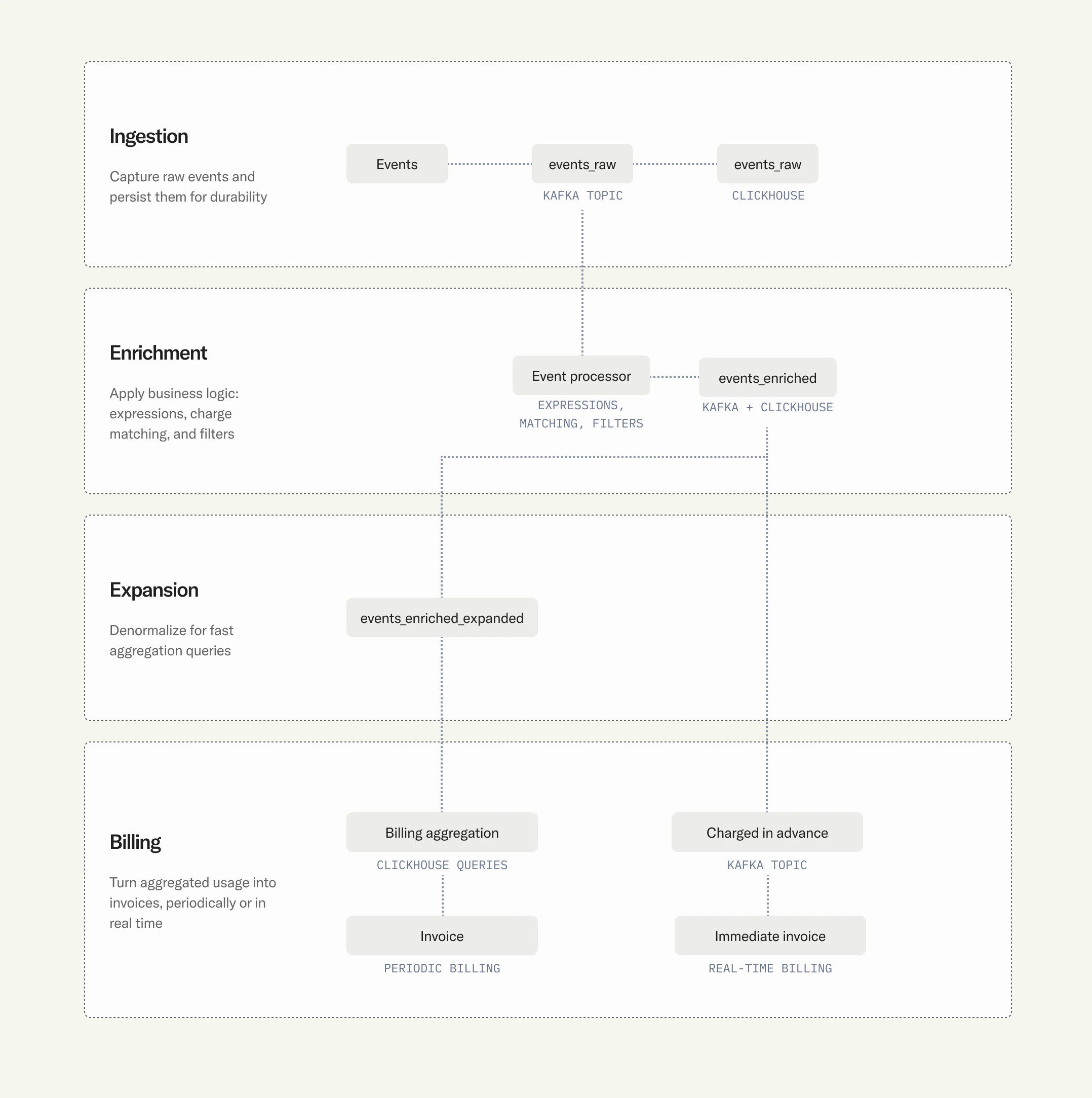
Under the hood, Lago’s high-volume pipeline is built on Kafka/Redpanda for streaming and ClickHouse for storage and aggregation.The pipeline
1
Raw ingestion
Event lands on
events_raw Kafka topic, then persisted to events_raw ClickHouse table (audit trail).2
Enrichment
Event processor evaluates custom expressions, extracts the metered value, matches to subscription/plan/charge, and applies charge filters (most-specific-match wins).
3
Enriched persistence
Enriched event written to
events_enriched topic and ClickHouse table with full billing context.4
Filter expansion
Events expanded across charge filter matches into
events_enriched_expanded table for granular aggregation.5
Pay-in-advance
Events matching pay-in-advance charges routed through
events_charged_in_advance topic for immediate invoicing.6
Billing aggregation
At invoice time, aggregation queries run directly on ClickHouse. Columnar storage enables billion-row aggregations in milliseconds.
Why ClickHouse?
10-20x compression
Compared to row stores. Billions of events stored efficiently.
Sub-second aggregation
Over massive datasets. Same queries power invoices and real-time usage dashboards.
Native Kafka integration
No ETL layer between Kafka and storage.
Full audit trail
Raw, enriched, and expanded events all queryable.
Data tables
Self-hosted vs. Lago Cloud
- Lago Cloud
- Self-hosted
ClickHouse and Kafka managed for you. You just send events.
Production benchmarks
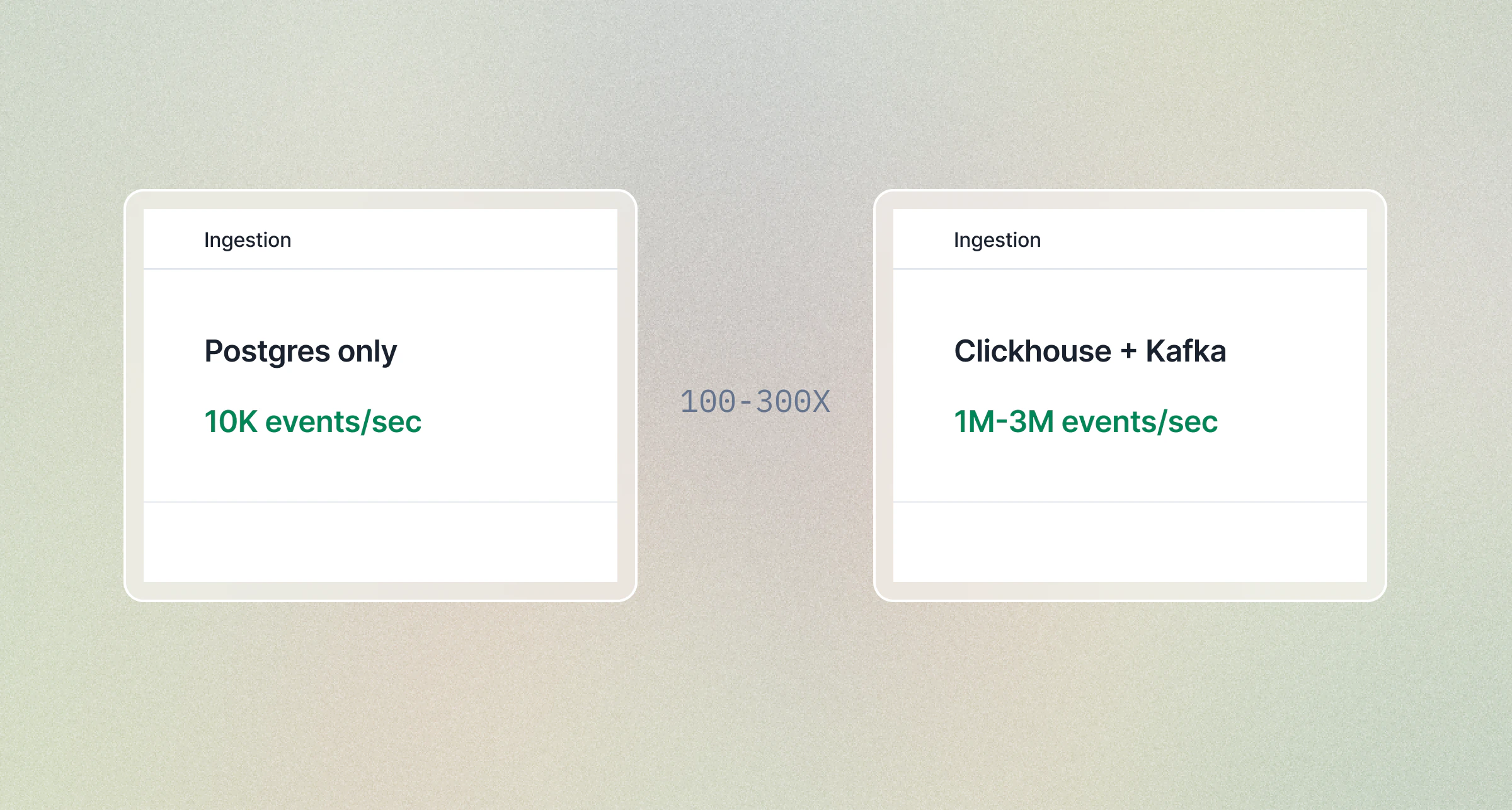
Usage ingestion benchmarks
Throughput by connector
REST API throughput optimization
Before moving to Kafka, maximize REST performance:- Always use the batch endpoint.
/api/v1/events/batchaccepts up to 100 events per request. - Parallelize. Send batch requests concurrently from multiple threads/workers.
- Reuse connections. HTTP keep-alive eliminates TLS handshake overhead.
- Retry safely. Events are idempotent by
transaction_id, so retries on 429 or 5xx are always safe.
Migrating from REST to Kafka
When you outgrow the REST API:1
No schema changes
Event format is identical across all methods.
2
Run both in parallel
Send new events via Kafka while existing REST producers still work. Both paths feed the same pipeline.
3
Validate parity
Compare event counts and billing outputs.
4
Cut over
Redirect all producers to Kafka.
Pre-aggregation: an advanced optimization
If you’ve already maximized your connector throughput and scaled your infrastructure, but still need to reduce pipeline load, you can aggregate events at the source before sending them to Lago. This is a technique for extreme volumes; most deployments never need it.When it works: Your billable metric uses
SUM, COUNT, or MAX aggregation.When it doesn’t: You need per-event pricing (each event has a different amount) or per-event audit trail.Pattern 1: Dimensional roll-ups
This is the most common pre-aggregation pattern. It applies when your pricing depends on one or more dimensions (region, instance type, model, tier) and you use aSUM or COUNT aggregation with charge filters in Lago.
Instead of sending one event per unit of work, you aggregate all usage for each unique combination of billing dimensions into a single event per time window. Lago’s charge filters still match on the dimension values in properties, so billing accuracy is preserved.
Use case: A cloud provider bills compute usage by instance type and region. Each VM emits a heartbeat every minute. That is 1,440 events per VM per day. With 400 instance types across 10 regions, raw volume can reach millions of events per customer per day.
With dimensional roll-ups: One event per customer per instance type per region per day. Even at 400 instance types x 10 regions, that is at most ~4,000 events/customer/day instead of millions.
instance_type and region fields in properties are the dimensions that Lago’s charge filters match against. Your SUM aggregation runs on hours. Because each combination is aggregated separately, the billing output is identical to sending raw events.
Multiple Lago customers run this pattern in production.
Pattern 2: Hourly roll-ups
When your billable metric has no dimensional breakdown (e.g., total API calls, total tokens), you can collapse each hour into one event per customer. We recommend 1-hour windows as the maximum aggregation frequency to keep near-real-time billing visibility. Before: 3,600 events/hour per customer (1 per second) After: 1 event/hour per customer, a 3,600x volume reduction (24 events/day instead of 86,400)SUM or COUNT aggregations where no charge filters are applied. The transaction_id includes the hour (T10) to ensure uniqueness across windows.
Choosing an aggregation window
Monitoring checklist
Data retention
Lago Cloud: 90 days. Data is retained for 90 days after subscription termination. Self-hosted: You control retention directly through your ClickHouse and database configuration.Air-gapped / private network deployments
Self-hosted Lago runs entirely inside your infrastructure — the application, database, and streaming layer all live in your environment. No data leaves your network, regardless of which connector you use. Lago Cloud requires network connectivity to Lago’s managed infrastructure. What’s available depends on your setup:
For organizations that cannot send events over the public internet, Lago Cloud with Kafka/Redpanda over VPC peering keeps your events on a private network link. Contact the Lago team to set this up.