

Choose a payment term
Lago offers six payment-term types. The examples below all use an invoice dated April 10, 2026 so you can compare the results.Choose the number of days
For Net days, Net days after end of month, and Days end of month, enter the number of days agreed with your customer. The 30-day examples above are not a fixed duration. For example, an invoice dated April 10 with Net 15 is due on April 25. With 15 net days after end of month, it is due on May 15. With 15 days end of month, it is due on April 30. Days are calendar days, including weekends. For example, Net 30 on an invoice dated January 31, 2026 gives a due date of March 2, 2026. You can enter from 0 to 365 days. With 0 days, these terms match a simpler one, and the invoice shows the simpler label:- Net 0 is shown as Due on receipt.
- 0 net days after end of month and 0 days end of month are shown as End of month.
Choose a day of the month
For Day of month, set Day of month and Month offset. The offset counts months from the invoice month; it defaults to 1, meaning the following month.
You can choose a day from 1 to 31 and a month offset from 0 to 12. When the selected day does not exist in the target month, Lago uses that month’s last day.
Which payment term applies?
Lago uses the most specific setting available, in this order:- The term set on the subscription, wallet, or one-off invoice.
- The customer’s term, if the item has no term of its own.
- The billing entity’s term, if the customer has no term of their own.
- Due on receipt, if no term is configured at any of these levels.
Set the billing entity default
Use this setting for the standard terms offered by your billing entity, such as Net 30 for an invoice dated April 10 to be due May 10.- Dashboard
- API
- Open Settings and select the billing entity.
- Open Invoicing settings.
- Click Edit in Payment terms.
- Choose a Term type and enter any days or month settings it requires.
- Review the example due date, then save your changes.
Set a customer’s payment terms
Use a customer setting when you have agreed different terms with that customer. For example, Net 45 gives them until May 25 to pay an invoice dated April 10, instead of May 10 under a Net 30 billing-entity default.- Dashboard
- API
- Open Customers and select the customer.
- Open their Settings tab.
- In Payment terms, add or edit the customer’s term.
- Choose a Term type and enter its days or month settings.
- Review the example due date, then save your changes.
Set terms for a subscription, wallet, one-off invoice, or quote item
Choose a term when you create or edit the item, or keep the inherited term. On subscriptions, wallets, and one-off invoices, the term is in Invoicing settings. Each item can use any of the six payment-term types.
Payment terms on a quote belong to its individual billing items. A subscription and a wallet in the same quote can have different terms.
Subscriptions with different effective payment terms are billed on separate invoices. Terms that always give the same due date, such as Net 0 and Due on receipt, count as the same term. See invoice consolidation.
Set payment terms from the API
Send apayment_term object on billing entities, customers, subscriptions, wallets, and one-off invoices. term_type sets the rule, and each type accepts only its own fields.
A missing field, an extra field, or a value out of range returns a
422 validation error. Send "payment_term": null to clear a term and inherit from the level above.
Invoices expose the term they were created with in payment_term, next to payment_due_date.
Legacy net_payment_term field
Billing entities and customers still accept and return the integer net_payment_term field. The organization returns it for its default billing entity.
- Sending
net_payment_term: 15alone sets{ "term_type": "net", "days": 15 }. - When a request sends both fields,
payment_termwins. - In responses,
net_payment_termreturns the days fornet,0fordue_on_receipt, andnullfor the four other types. Usepayment_termto read the full term.
payment_term. If you send net_payment_term to these endpoints, Lago ignores it and the inherited term applies.
Invoice dates and later changes
Payment terms are calculated from the issuing date shown on the invoice. The billing period describes the service being billed. The grace period gives your team time to review a draft invoice before finalization. These are separate settings. In this Net 15 example, the issuing date matches finalization on November 15, so payment is due November 30: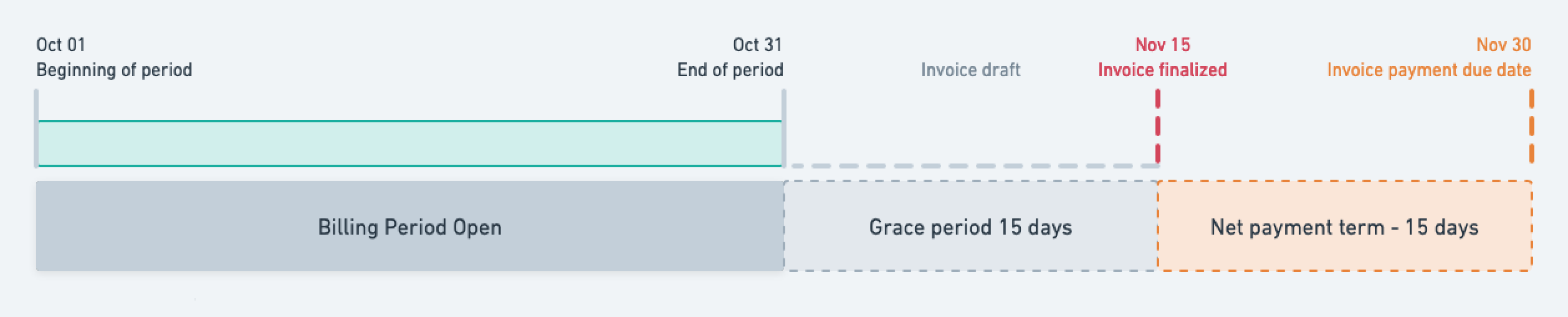
Net 15 when the invoice's issuing date and finalization date are both November 15
Overdue invoices
An unpaid invoice is marked overdue after its payment due date has passed. Lago emits theinvoice.payment_overdue webhook message.
The invoice remains overdue until its payment succeeds, a payment dispute is recorded as lost, or the invoice is voided.